
PDF to Link: Host a PDF and Share It as a Short URL
What does "PDF to link" mean?
A PDF on your computer has no address. Nobody can open it until it lives somewhere on the web, which usually means uploading it to a website, a file-sharing account, or cloud storage first — and then sharing whatever long, unmemorable URL that service hands back.
Linkly does both halves at once. Upload the PDF and we host the file for you, then point a short link at it. You share the short link.
People describe this job in different ways: turning a PDF into a URL, a PDF link generator, sharing a PDF as a link, hosting a PDF. It is all the same thing: giving a file an address that is short enough to share, and a link you still control afterwards.
Why not just link to the file directly?
Because the short link can be changed and the file cannot.
Once a PDF URL is printed on a flyer, pasted into a scheduled email, or turned into a QR code on packaging, it is fixed forever. If the document changes, that URL is wrong and there is nothing you can do about it.
With a Linkly link in front of the file, you can swap the PDF whenever you like — upload a new version and every link, QR code and printed copy already out in the world points at the new document. Nothing needs reprinting.
The same applies to the usual workarounds. A Google Drive or Dropbox share link is long, it opens a preview page rather than the document, and the reader may hit a request access prompt if the sharing setting is wrong. Move or rename the file and the link dies. An email attachment cannot be updated at all once it has been sent, and tells you nothing about whether it was opened.
You also get everything Linkly does for any other link: click tracking, a QR code, your own custom domain, country and device redirects, and expiry dates.
How to create a link to a PDF (turn a PDF into a link)
Sign in or sign up to Linkly
Create a free account if you don't have one. PDF hosting is included on every plan, including the free one.
Click Create New Link from the menu.
Under the Destination field, choose the PDF link type.
The link type buttons sit directly under the destination box, alongside Email, SMS, Call and WhatsApp.
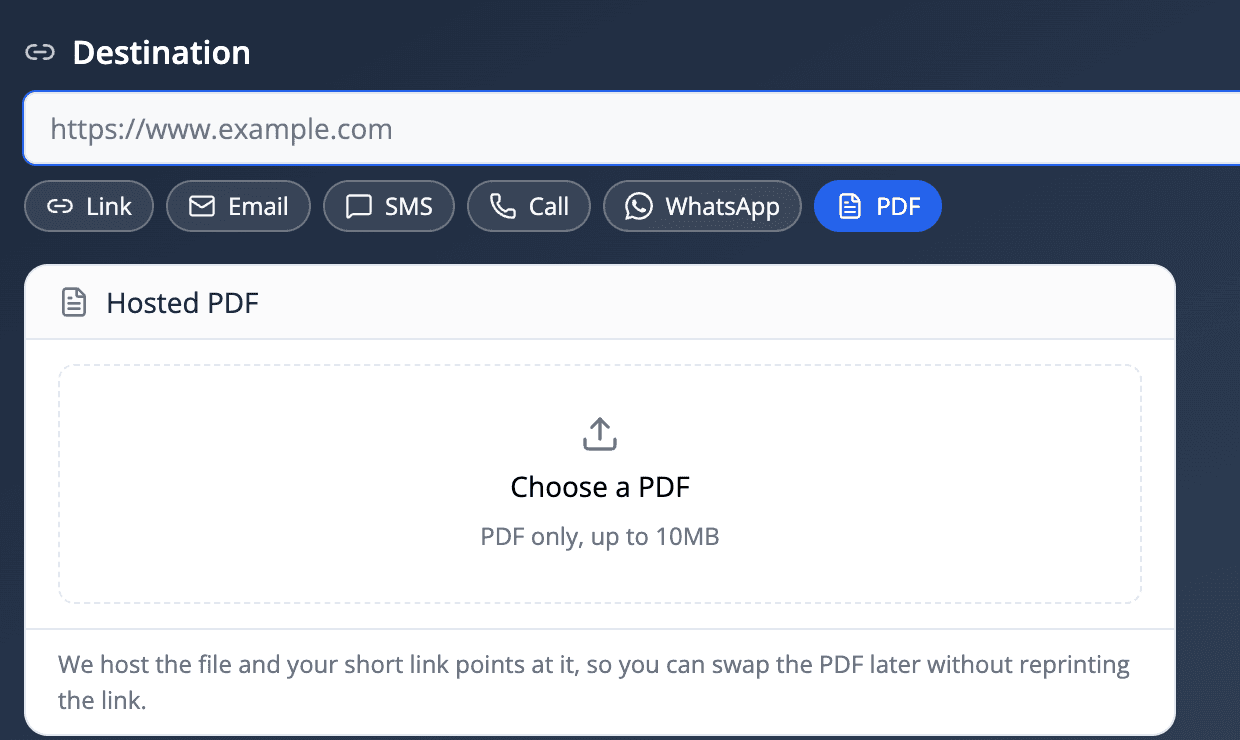
Click Choose a PDF and pick your file.
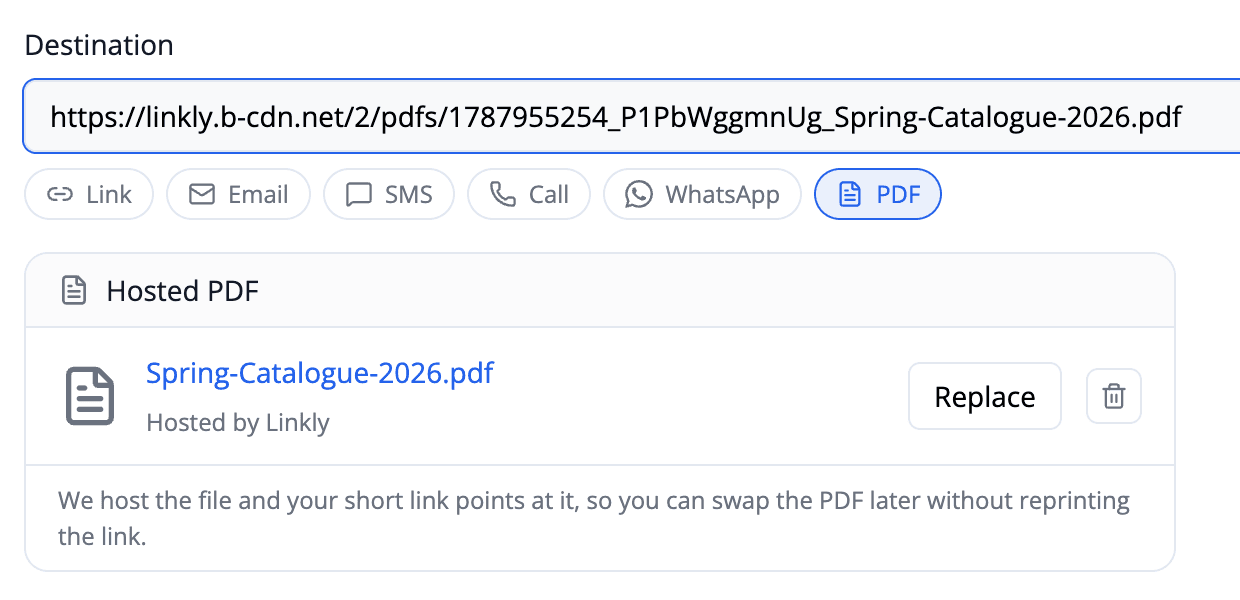
Files can be up to 10MB. The upload starts straight away, and when it finishes your destination is filled in with the address of the hosted file.
Give your link a Nickname.
This is private and only helps you find the link later. Nobody who clicks the link will see it.
Click Save.
Linkly creates your short link and generates a QR code for it automatically. Share either one — both open the PDF.
Replacing the PDF later
This is the part that makes hosting the file with Linkly worth doing.
Open the link, click Edit, then Replace next to the file name, and choose a new PDF. The short link and its QR code stay exactly the same, so every copy already printed, emailed or scheduled now serves the new document.

A price list, a menu, a timetable, a product manual, a term-time calendar — anything that gets revised on a schedule is a good candidate. Print the QR code once and update the document behind it as often as you need.
Replacing a file deletes the one it replaces, so old versions don't linger.
Deleting a hosted PDF
Click the bin icon next to the file name. The PDF is deleted from our storage immediately and permanently, and the short link stops resolving to it.
There is no undo, so if you might want the document again, download a copy before deleting it.
Limits
- Maximum file size: 10MB per PDF.
- File type: PDF only. To host an image instead, use a custom social preview or link to it directly.
- Number of files: there is no cap on how many PDFs you host.
Who can open a hosted PDF?
Anyone with the address. Hosted PDFs are public files — there is no login in front of them — but the address itself contains a long random string, so nobody can guess or discover it.
If you need to control who reads a document, put a password on the link or set it to expire after a date or a number of clicks.
Link a QR code to a PDF
Every Linkly link comes with a QR code, so a hosted PDF is also a scannable one: print the QR code on a menu stand, a poster, a product box or a business card, and a phone camera opens the document. Because the QR code encodes the short link rather than the file, you can replace the PDF later and the printed QR code keeps working. The QR code guide covers styling, logos and download formats.
Tracking who opens your PDF
Every open is a click, so all of Linkly's reporting applies: how many people opened the document, when, from which country, on which device, and from which campaign if you tagged the link with UTM parameters.
This is the main practical advantage over emailing an attachment — an attachment tells you nothing once it leaves your outbox.
Frequently asked questions about hosting PDFs
How large can my PDF be?
Up to 10MB. If your file is larger, compressing images inside the PDF usually brings it well under the limit. Most text-heavy documents are only a few hundred kilobytes.
Can I replace the PDF after sharing the link?
Yes — that's the point of hosting it behind a short link. Click Replace, choose a new file, and every existing copy of the link and its QR code points at the new document. The link itself never changes.
Does the PDF open in the browser or download?
It opens in the browser's built-in PDF viewer on most desktop browsers and phones. Readers can then save or print it from there. Some mobile browsers download the file instead, which is a setting on the reader's device rather than something the link controls.
Is my PDF private?
The file is public to anyone who has the address, and there is no sign-in in front of it. The address includes a long random string, so it can't be guessed. For genuinely confidential documents, add a password to the link or an expiry date.
Can I use my own domain for the link?
Yes. A hosted PDF works with custom domains exactly like any other link, so you can share it as yourbrand.com/brochure.
Can I create a QR code for a PDF?
Yes, and it's automatic — every Linkly link gets a QR code. Because the QR code points at the short link rather than the file, you can print it and still swap the PDF behind it later.
What happens to the file if I delete the link?
Deleting a link does not delete the file. To remove the PDF from our storage, click the bin icon next to the file name in the link's destination panel.
Can I upload a PDF through the API?
Not yet — uploads happen in the app. You can still set a link's destination to a PDF you host elsewhere via the API, and track it the same way.
Other link types Linkly can create
A PDF isn't the only destination Linkly builds for you. You can also create trackable, shortened links for:
-
Mailto Links — open the reader's email client with To, CC, BCC, subject and body pre-filled.
-
SMS Links — open the messaging app with a phone number and message ready to send.
-
Call Links — start a phone call when tapped on a mobile device.
-
WhatsApp Links — drop the reader into a WhatsApp conversation with optional pre-filled text.
Like hosted PDFs, each of these can be tracked, given a QR code, and served from your own custom domain.
Plan availability
Included on every plan
Get 100 short links and track 500 monthly clicks for free.