
Modo Privado: Contar Clics Sin Recopilar Datos Personales
Algunos enlaces no deberían rastrear a las personas que los hacen clic. Un código QR en un folleto para pacientes, un enlace en una carta del sector público, un número de línea de ayuda en un póster, un enlace enviado a un grupo al que ha prometido no perfilar: aún necesita saber que el enlace se está utilizando, pero no desea, o no puede, recopilar datos personales sobre cada visitante.
El modo privado maneja esto de un enlace a la vez. El enlace y su código QR siguen funcionando exactamente como antes, y aún puede cambiar a dónde apuntan. Los clics siguen siendo contados, pero cada clic se registra sin nada que pudiera identificar a la persona que lo hizo.
Lo que registra el modo privado
| Aún se registra | Nunca se recopila |
|---|---|
| Número de clics | Dirección IP |
| La hora en que ocurrió cada clic | País, región, ciudad y código postal |
| Tipo de navegador y dispositivo (por ejemplo Safari, iOS) | Proveedor de Internet y red |
| Si el clic fue un bot | Sitio web referente |
| A qué destino fue el clic | Parámetros de URL (incluidos los ID de clics de anuncios) |
| Cadena de agente de usuario completa y huella digital del dispositivo |
Los tiempos de clic se mantienen hasta la hora, no hasta el segundo. Una marca de tiempo exacta a veces puede coincidir con los propios registros del sitio web de destino para identificar una visita individual, por lo que no guardamos una.
La dirección IP de su visitante aún tiene que llegar a nuestros servidores para entregar la redirección, como con cualquier sitio web. Para un enlace en modo privado, se utiliza solo para eso y para el filtrado de bots en el momento del clic, luego se descarta. No se almacena en sus datos de clic, en nuestra base de datos de análisis ni en los registros de nuestra aplicación.
Cómo activar el modo privado para un enlace
Abra el enlace que desea hacer privado, o haga clic en Crear Nuevo Enlace.
El modo privado funciona en cualquier enlace, incluidos los enlaces que ya ha impreso como códigos QR. Activarlo no cambia el enlace corto ni el código QR.
En Seguimiento y análisis, abra Modo privado.
Está en la lista de configuraciones de seguimiento, justo después de Seguimiento de conversiones.
Active Registrar clics de forma anónima.
La sección muestra exactamente qué aún se registra y qué nunca se recopila, y aparece un distintivo Activo junto a su título.
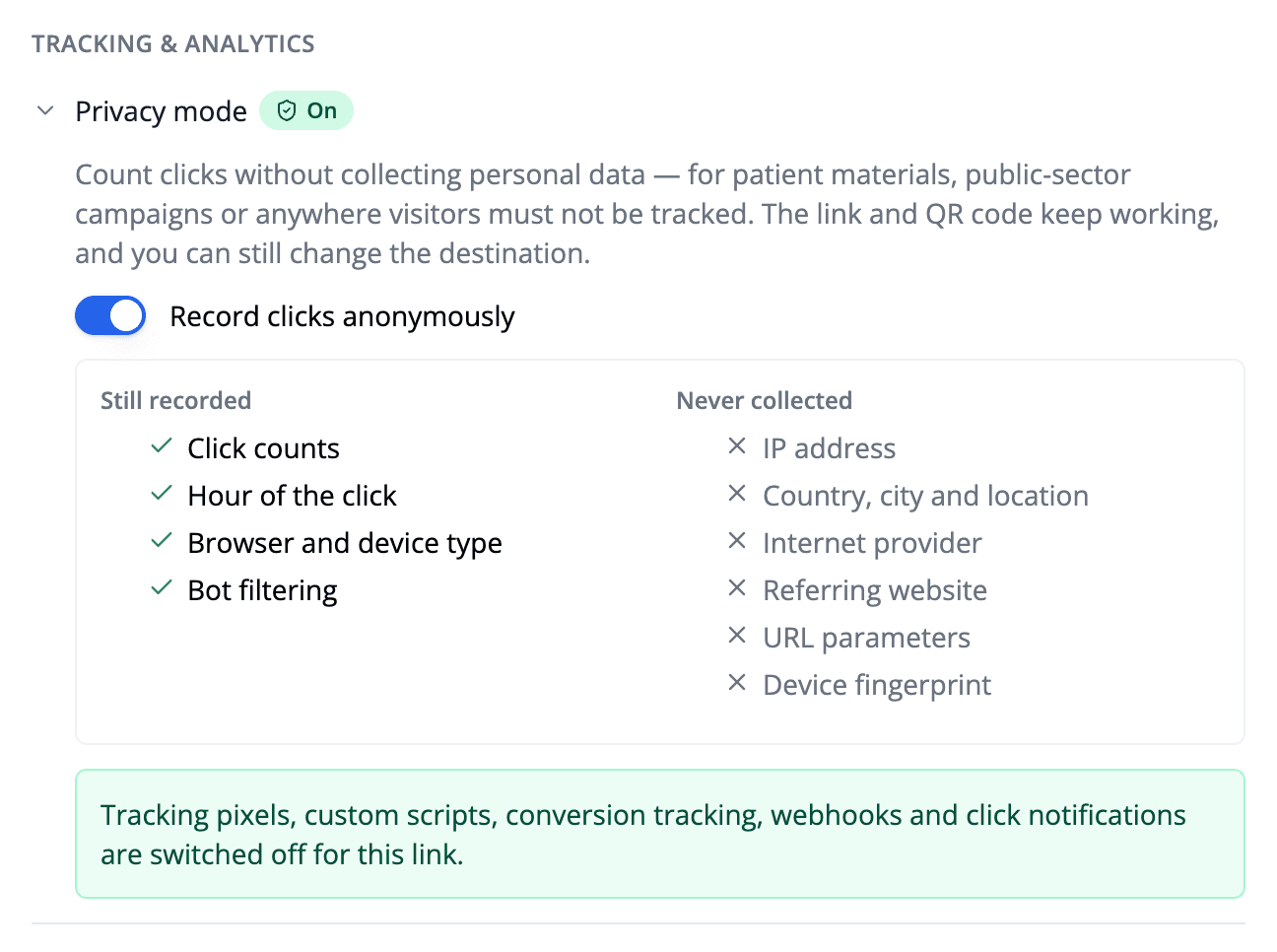
Haga clic en Guardar.
A partir de este momento, cada clic en el enlace se registra de forma anónima. La página del enlace muestra un distintivo de Modo privado junto al nombre del enlace, para que pueda ver de un vistazo qué enlaces son privados.

Configuraciones que el modo privado desactiva
Algunas configuraciones de enlace existen para recopilar o transmitir información sobre el visitante, por lo que no se pueden combinar con el modo privado. Activar el modo privado las desactiva para ese enlace:
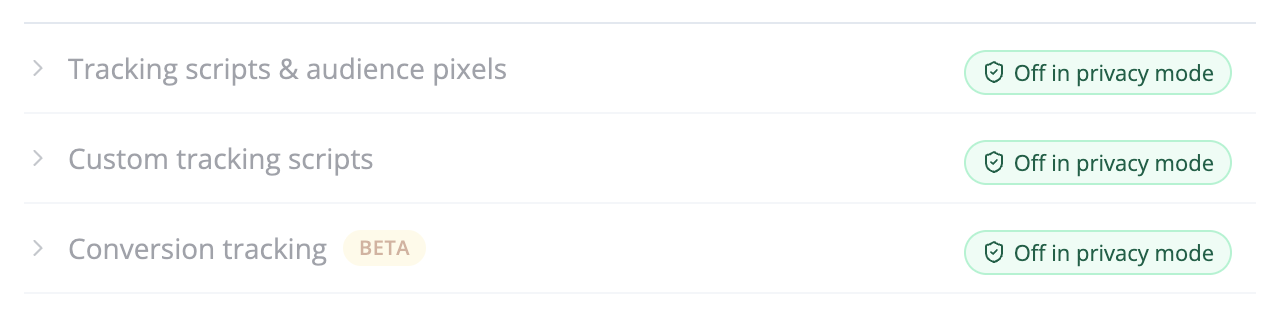
- Píxeles de rastreo (Meta, Google Analytics, Google Tag Manager, TikTok, LinkedIn y otros)
- Scripts de rastreo personalizados
- Seguimiento de conversiones
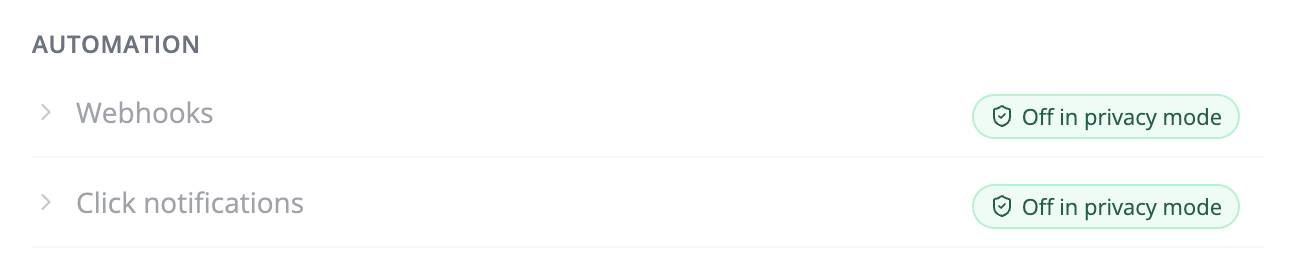
- Webhooks
- Notificaciones de clics
Permanecen visibles en el editor de enlaces, desactivadas y marcadas como Desactivado en modo privado, para que siempre sea claro qué está haciendo la configuración:
Los webhooks merecen una mención especial. Un webhook llega en el momento en que alguien hace clic, por lo que incluso uno vacío revelaría el segundo exacto de la visita. Por lo tanto, los enlaces en modo privado no envían webhooks de clics en absoluto, incluidos los configurados para todo su espacio de trabajo, y no aparecen en el feed de clics en vivo.
Si desactiva el modo privado más tarde, estas configuraciones permanecen desactivadas. Nada se vuelve a activar sin que usted lo elija.
Lo que aún funciona
Todo lo que decide a dónde va un visitante, en lugar de registrar quién es:
- Editar el destino. Cambie el destino del enlace o código QR siempre que quiera.
- Redireccionamientos por país y dispositivo, rotación de enlaces, caducidad y protección con contraseña. El país y el dispositivo se utilizan en el momento del clic para elegir el destino y no se almacenan.
- Dominios personalizados, etiquetas UTM y parámetros reenviados.
- Bloqueo de bots.
Análisis para un enlace en modo privado
Los totales de clics, el gráfico diario (y por hora), los informes de tipo de navegador y dispositivo y el filtrado de bots funcionan normalmente. Los informes que dependen de datos personales permanecen vacíos: ubicación, proveedor de Internet, referente, parámetros de URL y visitantes únicos. La página de análisis explica por qué, para que un informe vacío no parezca datos faltantes:

Modo privado y GDPR
El modo privado está diseñado para enlaces donde recopilar datos personales es un problema: material orientado a pacientes, donde incluso saber que alguien escaneó un código QR en un folleto de medicamentos puede contar como datos de salud; comunicaciones del sector público; o cualquier campaña en la que se haya comprometido a no perfilar a la audiencia.
Debido a que un enlace en modo privado no almacena dirección IP, ubicación, identificador o marca de tiempo exacta, sus registros de clics no contienen datos personales sobre el visitante. Eso hace que sea mucho más simple de describir en una evaluación de impacto de protección de datos o una revisión médico-legal. Aún debe verificar cómo se aplican los requisitos de su propia organización. Nuestra página GDPR cubre cómo Linkly maneja los datos para enlaces ordinarios.
Preguntas frecuentes sobre el modo privado
¿Cambia el enlace o código QR cuando activo el modo privado?
No. El enlace corto y el código QR permanecen exactamente igual, por lo que puede activar el modo privado para enlaces que ya están impresos o compartidos.
¿Aún puedo cambiar a dónde va el enlace?
Sí. El modo privado solo cambia lo que se registra sobre cada clic. Puede editar el destino tantas veces como desee.
¿Los clics se siguen contando?
Sí. Cada clic se cuenta, con su hora, navegador y tipo de dispositivo, y si vino de un bot. Los clics en modo privado cuentan hacia la asignación de clics de su plan como cualquier otro clic.
¿Qué sucede con los clics registrados antes de que active el modo privado?
Se mantienen como estaban. El modo privado se aplica desde el momento en que lo guarda. Si necesita que se eliminen los datos de clic anteriores, póngase en contacto con nosotros.
¿Qué sucede si desactivo el modo privado nuevamente?
Los clics a partir de entonces se registran normalmente. Los clics registrados mientras el modo privado estaba activo permanecen anónimos, porque nunca se recopilaron los datos personales. Los píxeles, webhooks y otras configuraciones que el modo privado desactivó permanecen desactivados hasta que los vuelva a activar.
¿Por qué no puedo ver visitantes únicos para un enlace en modo privado?
Contar visitantes únicos significa reconocer a la misma persona dos veces, lo que requiere algo que los identifique. El modo privado deliberadamente no mantiene nada de eso, por lo que solo están disponibles los clics totales.
¿Aún puedo redirigir por país?
Sí. La ubicación del visitante se calcula en el momento del clic para elegir el destino correcto y luego se descarta. Nunca se almacena.
¿Puedo activar el modo privado a través de la API?
Sí. Establezca privacy_mode en true al crear o actualizar un enlace con la API. Activarlo borra los píxeles del enlace, scripts personalizados, seguimiento de conversiones, webhooks y notificaciones de clics, tal como lo hace en la aplicación.
Artículos relacionados
Disponibilidad del plan
Disponible desde Starter
Rastrea 500 clics mensuales con todas las funciones incluidas.