
Linkly's Analytics API
Exportieren Sie Klickdaten und Verkehrsberichte von Linkly programmgesteuert über unsere Analytics API.
Verwandt: Link Shortening API | Webhooks
Bevor Sie beginnen
Linkly generiert API-Anfragen in der Benutzeroberfläche für Sie zum Kopieren und Einfügen in Ihre Anwendungen.
Sparen Sie Zeit und lassen Sie uns die schwere Arbeit erledigen. Unsere API ist vollständig maschinenlesbar.
So beginnen Sie mit der Analytics API
Öffnen Sie einen beliebigen Verkehrsbericht in Linkly.
Kopieren Sie die API-Anfrage oben im Bericht.
Das Ausgabedatenformat ist CSV. Dieser Link enthält Ihren API-Schlüssel.
Diese Links befinden sich neben jeder Tabelle und jedem Diagramm in Linkly.
Bitten Sie ChatGPT oder ein gleichwertiges Tool, diese Anfragen an den Quellcode Ihrer Anwendung anzupassen.
Es ist nicht nötig, Zeit mit komplexer Integration zu verschwenden.
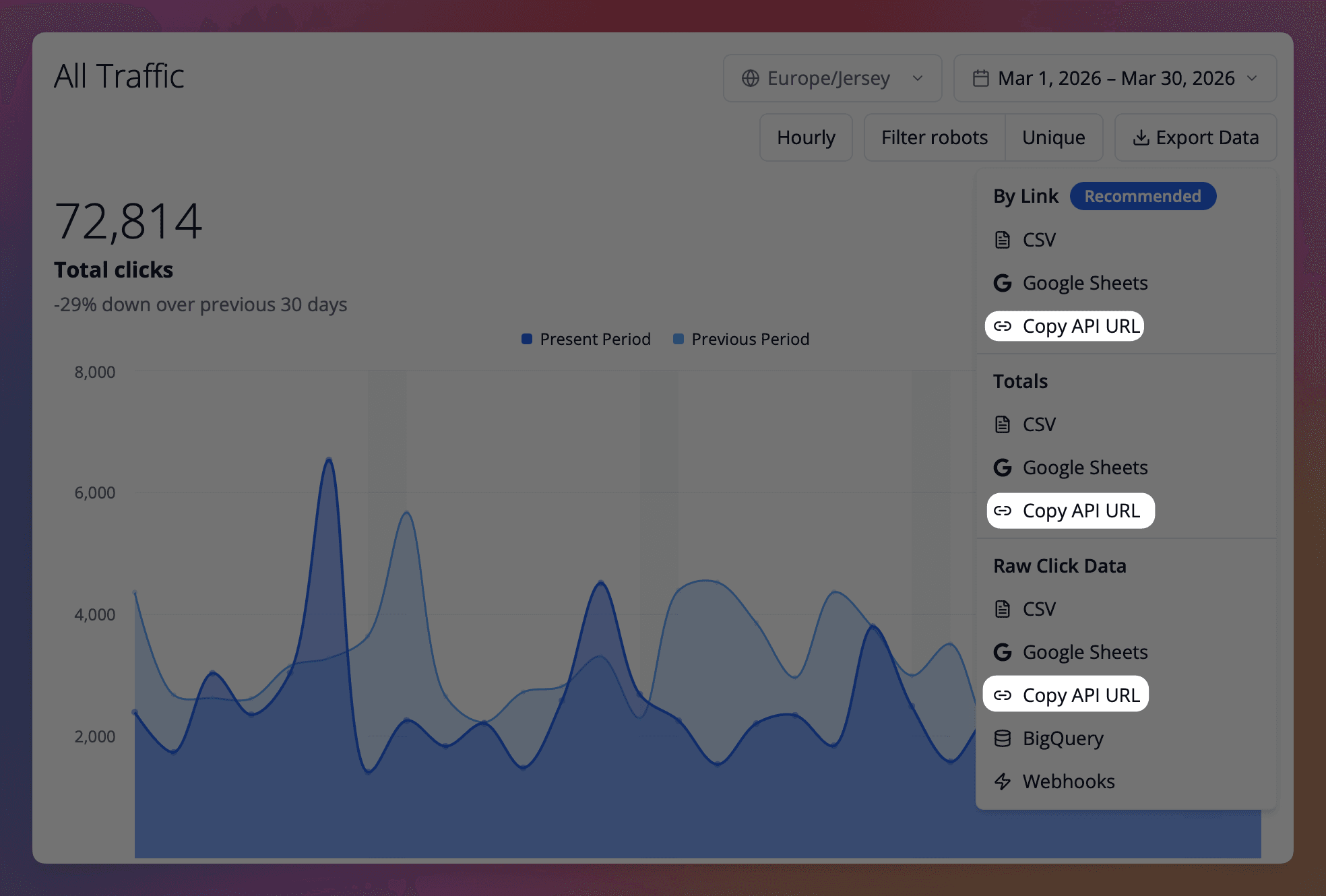
Linkly's Verkehrsberichte generieren automatisch API-Anfragen für Sie, basierend auf den Daten, die auf dem Bildschirm angezeigt werden.
Diese Links enthalten Ihren API-Schlüssel und sind einfach anpassbar und in Ihren eigenen Anwendungen verwendbar.
Ausgabeformate
Die Analytics API unterstützt drei Ausgabeformate:
| Format | Parameter | Beschreibung |
|---|---|---|
| JSON | format=json (Standard) | Strukturierte Daten für Anwendungen |
| CSV | format=csv | Kommagetrennte Werte für Tabellenkalkulation |
| TSV | format=tsv | Tabstoppgetrennte Werte, ideal zum Anzeigen im Browser und zum Einfügen in Tabellenkalkulationen |
Pivot-Modus (Matrixformat)
Standardmäßig gibt die API Zeitreihendaten mit einer Zeile pro Datum zurück. Mit dem Pivot-Modus können Sie den gesamten Verkehr Ihrer Links in einer einzigen Anfrage als Matrix abrufen.
Verwenden Sie das Dropdown Daten exportieren in einem beliebigen Verkehrsbericht, um Daten schnell nach Link zu exportieren, oder fügen Sie pivot=link_id zu Ihrer API-Anfrage hinzu.
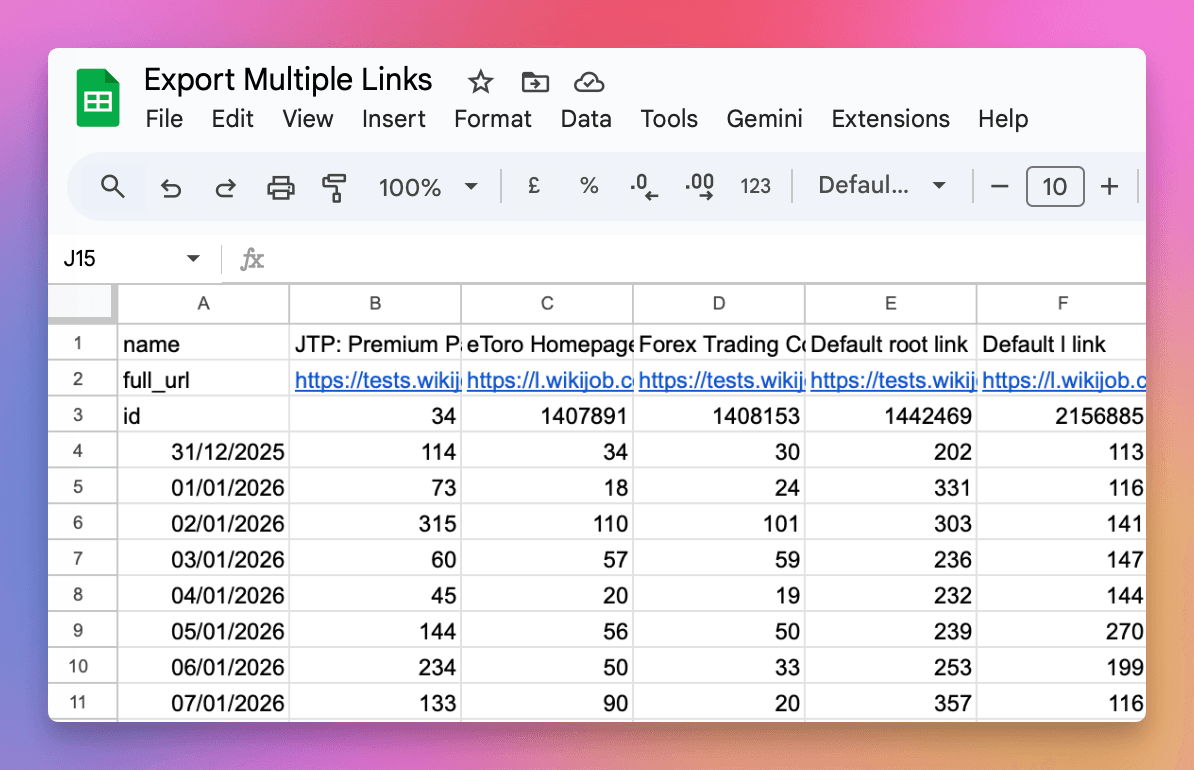
Fügen Sie pivot=link_id zu Ihrer Anfrage hinzu, um Daten mit folgenden Eigenschaften zu erhalten:
- Daten als Zeilen (eine Zeile pro Tag)
- Links als Spalten (eine Spalte pro Link)
Beispiel für CSV/TSV Pivot-Ausgabe
| Mein Link | Anderer Link | |
|---|---|---|
| name | Mein Link | Anderer Link |
| full_url | https://linkly.link/abc | https://linkly.link/xyz |
| id | 123 | 456 |
| 2025-12-30 | 45 | 12 |
| 2025-12-31 | 52 | 8 |
| 2026-01-01 | 38 | 15 |
Beispiel für JSON Pivot-Ausgabe
{
  "links": [
    {"id": 123, "name": "My Link", "full_url": "https://linkly.link/abc"},
    {"id": 456, "name": "Other Link", "full_url": "https://linkly.link/xyz"}
  ],
  "data": [
    {"date": "2025-12-30", "clicks": {"123": 45, "456": 12}},
    {"date": "2025-12-31", "clicks": {"123": 52, "456": 8}}
  ]
}
Der Pivot-Modus ist nützlich für:
- Vergleichen von Verkehr über mehrere Links hinweg
- Importieren in Tabellenkalkulationen zur Analyse
- Erstellen von Dashboards mit allen Link-Daten in einem Aufruf
Rohdaten von Klicks
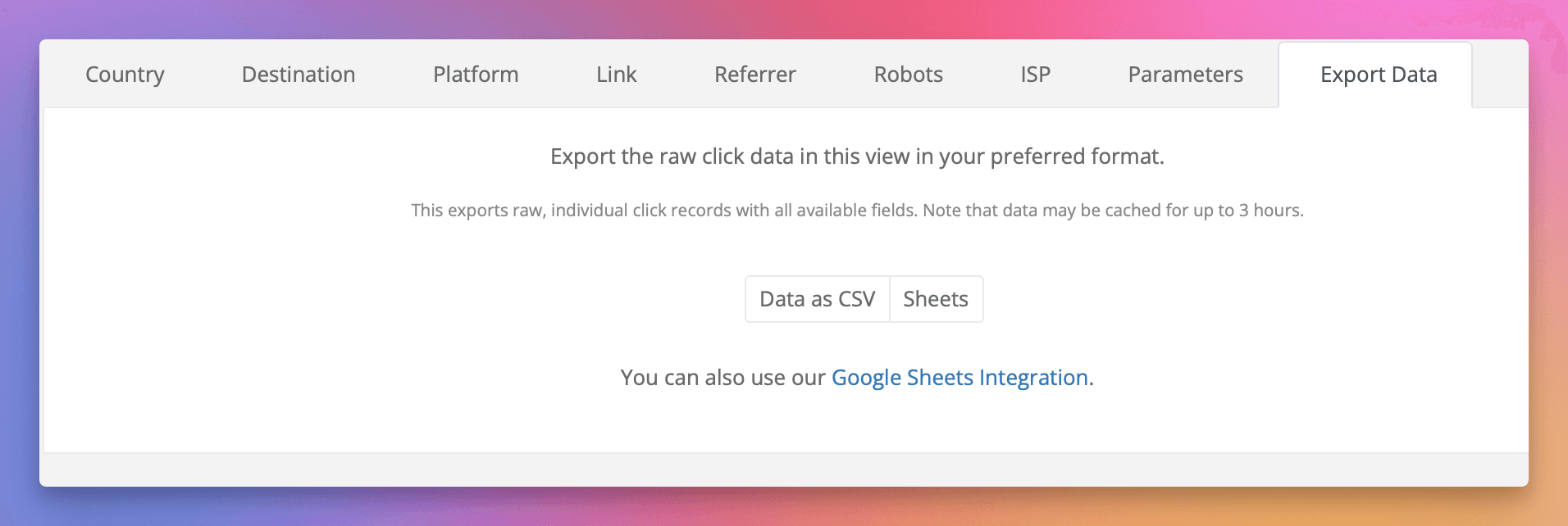
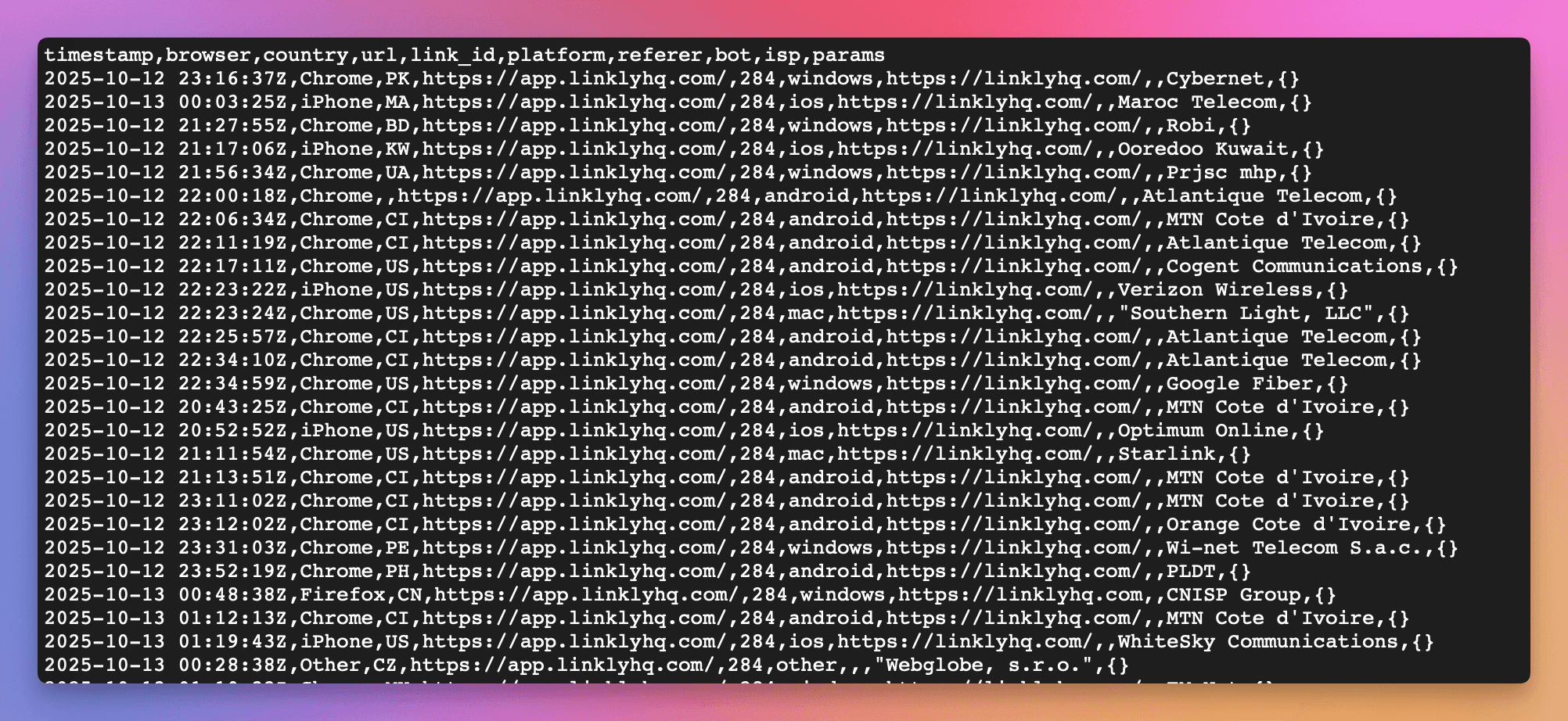
Die Rohdaten der Klicks, die wir erfassen, einschließlich aller Parameter, Zeitstempel und Geolokalisierungsinformationen, sind verfügbar.
Um auf diese Daten zuzugreifen, klicken Sie auf Exportieren in den Registerkarten unten und wählen Sie Ihr Format aus. Dies sind vollständig geformte API-Anfragen, die Sie direkt in Ihrer Anwendung verwenden können.
Hinweise zum Datenexport
- Erwägen Sie, Daten in der Ansicht zu filtern, um die Menge der exportierten Daten zu reduzieren. Diese Funktion exportiert die zugrunde liegenden Daten, die zur Generierung des aktuellen Berichts auf dem Bildschirm verwendet werden.
- Diese Daten werden bis zu 3 Stunden lang zwischengespeichert. Wiederholte Anfragen an diesen Endpunkt erzeugen keine Echtzeit-Daten.
Gruppierte Zählungen
Der Endpunkt /counters/{dimension} gibt Click-Summen gruppiert nach einer einzelnen Dimension zurück – z. B. country, platform, destination, referer, isp oder link_id. Die Ergebnisse werden nach Click-Anzahl sortiert, höchste zuerst.
Es werden maximal 10.000 Werte zurückgegeben. Dimensionen mit hoher Kardinalität – destination, referer, remote_ip und isp – können auf einem arbeitsreichen Workspace weit mehr unterschiedliche Werte haben. In diesem Fall erhalten Sie die Top-10.000 nach Click-Anzahl, und der Rest wird nicht zurückgegeben.
Das Feld total ist immer die Summe der Clicks über jede Gruppe, einschließlich der nicht zurückgegebenen. Bei einem gekürzten Ergebnis addieren sich die count-Werte zu weniger als total – was bedeutet, dass ein als count / total berechneter Prozentsatz immer noch genau ist.
Wenn Sie den vollständigen Satz von Werten anstelle der Top-10.000 benötigen, exportieren Sie die Rohdaten von Klicks und aggregieren Sie diese selbst, oder verwenden Sie die BigQuery-Integration.
Echtzeit-Klick-Benachrichtigungen
Für Echtzeit-Klick-Benachrichtigungen siehe Webhooks. Webhooks senden unmittelbar nach dem Auftreten eines Clicks eine POST-Anfrage an Ihre angegebene(n) URL(s) mit detaillierten Informationen zum Click.
Sie können Webhooks auch über die API verwalten – siehe die OpenAPI-Spezifikation für Details.
Fair-Use-Richtlinie
Ratenlimits
Die Analytics API ist auf 50 Anfragen pro Stunde pro Workspace beschränkt.
Nutzungslimits
Zusätzlich zu den Ratenlimits hat die Analytics API Nutzungslimits, die sich jede Abrechnungsperiode zurücksetzen:
| Plan-Typ | API-Anfragen | Gescannte Daten |
|---|---|---|
| Kostenlos | 100/Monat | 10 GB/Monat |
| Monatlich bezahlt | 2.000/Monat | 2 TB/Monat |
| Jährlich bezahlt | 24.000/Jahr | 24 TB/Jahr |
| Monatlich unbegrenzt | 10.000/Monat | 2 TB/Monat |
| Jährlich unbegrenzt | 120.000/Jahr | 24 TB/Jahr |
Was als Nutzung zählt
- API-Anfragen: Jeder Aufruf der Analytics API-Endpunkte (
/clicks,/counters,/export) zählt als eine Anfrage. Link-Exporte (/links/export), die mit einem API-Schlüssel erstellt werden, zählen ebenfalls als eine Anfrage. - Gescannte Daten: Die Menge der Daten, die von unserer Analyticsdatenbank verarbeitet werden, um Ihre Anfrage zu erfüllen. Größere Datumsbereiche und komplexere Abfragen scannen mehr Daten.
Was passiert, wenn Sie die Limits überschreiten
Wenn ein Workspace in einem bezahlten Plan alle seine API-Anfragen verwendet, fügen wir automatisch ein API-Paket zu seinem Abonnement hinzu, damit Ihre Integrationen weiterhin funktionieren, und benachrichtigen die Mitglieder des Workspaces per E-Mail. Ein API-Paket fügt jede Abrechnungsperiode zusätzliche API-Anfragen hinzu, bis Sie es entfernen.
API-Anfragen geben stattdessen einen 429 Too Many Requests-Fehler zurück, wenn:
- 1Der Workspace in den kostenlosen oder Starter-Plan gehört, der keine API-Pakete hinzufügen kann
- 2Das Abonnement des Workspaces ist auf Stornierung eingestellt oder eine Zahlung ist überfällig
- 3Der Workspace hat sein Limit für gescannte Daten aufgebraucht – API-Pakete fügen Anfragen hinzu, nicht Daten
Nutzungslimits setzen sich zu Beginn jeder Abrechnungsperiode zurück, und Ihre Links funktionieren und verfolgen Clicks auf jeden Fall normal.
Tipps zur Reduzierung der Nutzung
Die meisten Benutzer können alle ihre Daten in einer einzigen API-Anfrage abrufen mit dem Pivot-Modus (pivot=link_id), der den gesamten Verkehr aller Links als Matrix in einem Aufruf zurückgibt.
- Verwenden Sie den Pivot-Modus: Fügen Sie
pivot=link_idhinzu, um den Verkehr für alle Links in einer einzigen Anfrage zu erhalten, anstatt jeden Link separat abzufragen - Cacheergebnisse: Speichern Sie API-Antworten lokal, anstatt dieselben Daten wiederholt abzurufen
- Verwenden Sie kleinere Datumsbereiche: Fragen Sie nur die Daten ab, die Sie benötigen
- Stapeln Sie Anfragen: Kombinieren Sie mehrere Link-Abfragen in einer einzigen Anfrage mit dem
link_ids-Parameter
Benötigen Sie mehr?
Sie können API-Pakete jederzeit selbst unter Add-ons auf der Seite Abrechnung hinzufügen. Jedes Paket fügt jede Abrechnungsperiode zusätzliche API-Anfragen hinzu; die Seite zeigt den Preis für Ihren Plan an, bevor Sie bestätigen.
API-Pakete ändern das Ratenlimit nicht. Wenn Sie ein höheres Ratenlimit benötigen, sprechen Sie bitte mit uns über das Support-Widget.
BigQuery-Integration
Für Anforderungen der Hochvolumen-Analytik bietet Linkly eine BigQuery-Integration, die direkten SQL-Zugriff auf Ihre Click-Daten bietet.
- Live-Datenzugriff - Fragen Sie Ihre Click-Daten direkt in BigQuery mit Echtzeit-Updates ab
- Unbegrenzte Abfragen - Keine API-Ratenlimits; Sie zahlen nur für BigQuery-Berechnung
- Benutzerdefinierte Berichterstattung - Erstellen Sie Dashboards mit Looker, Data Studio oder Tableau
- Datenverfestigung - Führen Sie Click-Daten mit anderen Geschäftsmetriken zusammen
Die BigQuery-Integration ist im Enterprise-Plan enthalten. Kontaktieren Sie uns für Details.
Mehr über BigQuery-Integration erfahren →
Verwandt
- Link Shortening API - Erstellen und aktualisieren Sie Links programmgesteuert
- Webhooks - Echtzeit-Klick-Benachrichtigungen
- BigQuery-Integration - Direkter SQL-Zugriff auf Click-Daten
- Zapier-Integration - No-Code-Integrationen
Tarifverfügbarkeit
Verfügbar ab Pro
Verfolgen Sie 500 monatliche Klicks kostenlos.