
Conversion Tracking
Click counts tell you a link was popular. They don't tell you it made any money.
Conversion tracking closes that gap. When someone clicks a Linkly link and later buys something, Linkly records the sale against the link that sent them — so you can see revenue per link, not just traffic per link.
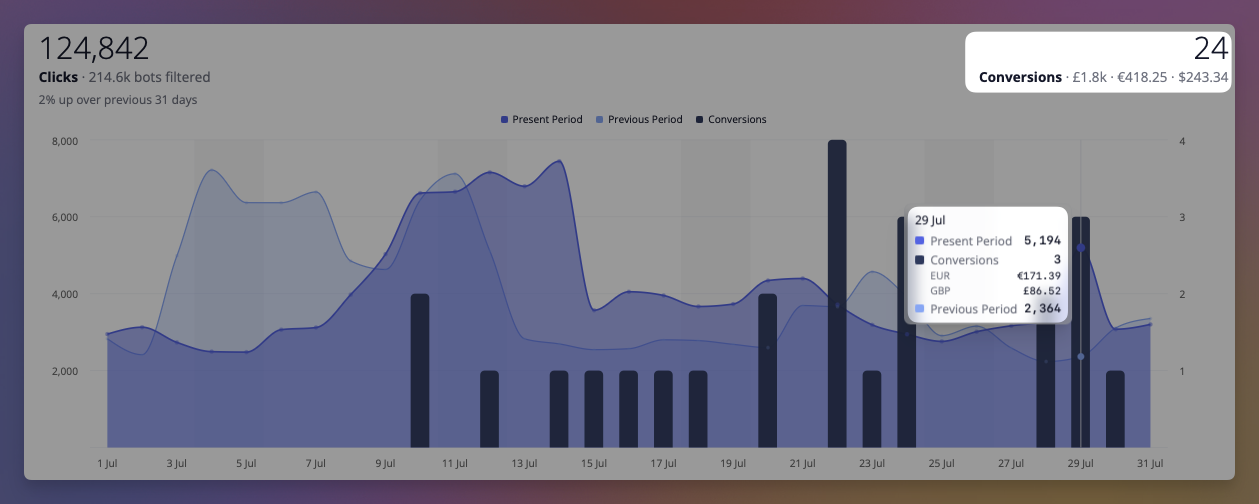
How it works
When conversion tracking is enabled on a link, Linkly adds a short identifier to the destination URL as it redirects:
https://yourstore.com/product?linkly_cid=2ejmw.01KYT5RTSHNMMPWWQ18V570TVG
That identifier names the click — not the person. It is remembered on the visitor's own device, and when a purchase happens it is sent back to Linkly so the sale can be matched to the click. If a purchase can't be matched to a link, Linkly discards it: your store is already the record of your sales, and Linkly's job is only to say which link earned them.
Choosing an integration
There are four ways for a sale to reach Linkly, and a link only needs one. Pick the row that matches where the money changes hands.
| Integration | Best for | Setup |
|---|---|---|
| Stripe app | Stripe Payment Links, and any checkout built on Stripe | Install the app from the Stripe App Marketplace, no code for Payment Links |
| Calendly | Booking pages, where a booked meeting is the conversion | Connect Calendly in Linkly, no code |
| Google Analytics 4 | Any site already sending purchases to GA4 | Add one script tag |
| API | Custom checkouts, server-side reporting | One HTTP request per sale |
Stripe and Calendly report over their own webhooks, so there is no script to install and nothing to add to the page. The other two rely on the Linkly script running on your site. When you paste a Stripe Payment Link or a Calendly page into the New Link form, Linkly points you at the right one.
Stripe
Install Linkly Conversion Tracking from the Stripe App Marketplace, click Connect to Linkly in the app, and choose the workspace the Stripe account belongs to. Then, for any link that points at a Stripe Payment Link, switch on Conversion tracking in its Tracking & analytics options. That is the whole setup: Linkly passes the click identifier to Stripe as client_reference_id, Stripe hands it back when the payment completes, and the sale is recorded against the link, with subscription renewals credited to the link that first won the customer and refunds subtracted.
If you build your own Checkout Sessions, pass the click identifier yourself as client_reference_id, or as linkly_cid in the metadata. The app is free and read-only. Full details in the Stripe guide.
Calendly
Connect Calendly from Integrations in Linkly, then turn on conversion tracking for links that point at a Calendly booking page. Each booking made through one of those links is recorded as a lead conversion. See the Calendly guide.
Google Analytics 4
If your site already sends purchases to GA4, Linkly can read the same event — no second integration and no changes to your existing tracking.
Add this to every page:
<script src="https://cdn.linklyhq.com/linkly.js" async></script>
There is nothing to configure and no key to copy — the attribution identifier already names the link, and a link belongs to one workspace, so Linkly works out where the sale belongs on its own.
Linkly watches for the GA4 purchase event and records a conversion when one fires, reading the transaction ID, value and currency from the event you're already sending. It works with gtag.js and with Google Tag Manager.
To track something other than purchases, list the events you want:
<script src="https://cdn.linklyhq.com/linkly.js" data-ga4-events="purchase,generate_lead" async></script>
To turn the GA4 bridge off and report conversions yourself, add data-ga4="false".
Reporting a sale yourself
For a custom checkout, report the sale from your own code:
linkly('track', 'purchase', { amount_cents: 4999, currency: 'USD', event_id: 'order-1234' });
Server-side reporting is more reliable and is the better choice where you have the option, because it can't be blocked by the browser. Read the attribution identifier with linkly('id'), send it to your backend along with the order, and report the sale from there.
Making sure it works
Always send an event ID — your order number is ideal. Linkly uses it to recognise a sale it has already seen, which is what stops a purchase being counted twice when a customer refreshes the confirmation page.
A few things worth knowing:
- Only clicks on tracked links count. Conversion tracking is enabled per link, so turn it on for the links you want measured.
- A sale is credited to the most recent link the visitor clicked. If someone clicks two of your links, the later one gets the credit.
- Attribution isn't instant to set up. A conversion can only be matched if the visitor arrived through a tracked link after the integration was live, so give it a day or so before judging the numbers.
Privacy
The identifier Linkly adds to your links is random. It identifies a click, not a person, and it carries no personal information — it can't be traced to an individual by anyone who sees it.
Where an integration sends customer details, Linkly stores them separately from the sale itself, so a deletion request removes the person without destroying the record of which link earned the revenue.
Troubleshooting
No conversions are appearing. Check the link has conversion tracking enabled, then click it yourself and confirm linkly_cid appears in the address bar on arrival. If it doesn't, the link isn't tracked. For a Stripe Payment Link, the New Link form and the Traffic page both say whether the Stripe app is connected to this workspace; if it isn't, nothing is recorded until it is.
GA4 purchases aren't recorded. Confirm the purchase event actually fires by watching GA4's DebugView while placing a test order. Linkly reads the same event, so if GA4 doesn't receive it, neither will Linkly.
Numbers don't match my store exactly. They shouldn't. Linkly counts only sales it can trace to one of your links; your store counts every sale. A gap between the two is the point of the feature, not a fault.
Get 100 short links and track 500 monthly clicks for free.