
WhatsApp Rotator: One Link for Multiple WhatsApp Numbers or Groups
What is a WhatsApp rotator?
A WhatsApp rotator is a single link that sends each click to one of several WhatsApp destinations, based on percentages you set. It's a specific application of Linkly's link rotator feature, and it's used in two ways:
- Rotating WhatsApp numbers - share new chats between the WhatsApp numbers of your sales or support agents, so one person isn't flooded while the others wait.
- Rotating WhatsApp groups - spread new members across several group invite links, because WhatsApp caps each group at 1,024 members.

Why use a WhatsApp rotator?
- Share leads fairly across your team - every agent's number gets its share of new chats from the same link.
- Manage group size limits - WhatsApp caps groups at 1,024 members. A rotator spreads new members across several groups.
- One link for every channel - use the same link on your website, social profiles, emails, SMS and QR codes instead of a separate number or group link for each.
- See who received what - Linkly's analytics show how many clicks went to each number or group.
- Change it any time - add, remove or reweight numbers and groups without changing the link you've shared.
Common use cases
- Sales teams - distribute enquiries from your website, social profiles and campaigns across several agents' WhatsApp numbers
- Customer support - balance incoming chats across support agents or regional support numbers
- Online communities - hobby groups, local communities and fan groups that outgrow a single group
- Course creators - student support groups for online courses
- E-commerce brands - customer communities and VIP groups
- Event organizers - distributing attendees across regional groups
Creating a WhatsApp rotator
WhatsApp rotators are available on the Pro plan and above. The steps are the same for numbers and groups - only the links you paste are different.
How to rotate chats across multiple WhatsApp numbers
Create a WhatsApp link for each number.
Use the format https://wa.me/15551234567, with the full number in international format and no +, spaces or dashes. This works for both WhatsApp and WhatsApp Business numbers.
To pre-fill the first message, add ?text= and your message, for example https://wa.me/15551234567?text=Hi%2C%20I%27d%20like%20a%20quote. Our free WhatsApp link generator builds these links for you.
Click Create New Link in Linkly.
Paste the first agent's WhatsApp link as the Destination.
Under the destination, click Rotate destinations.
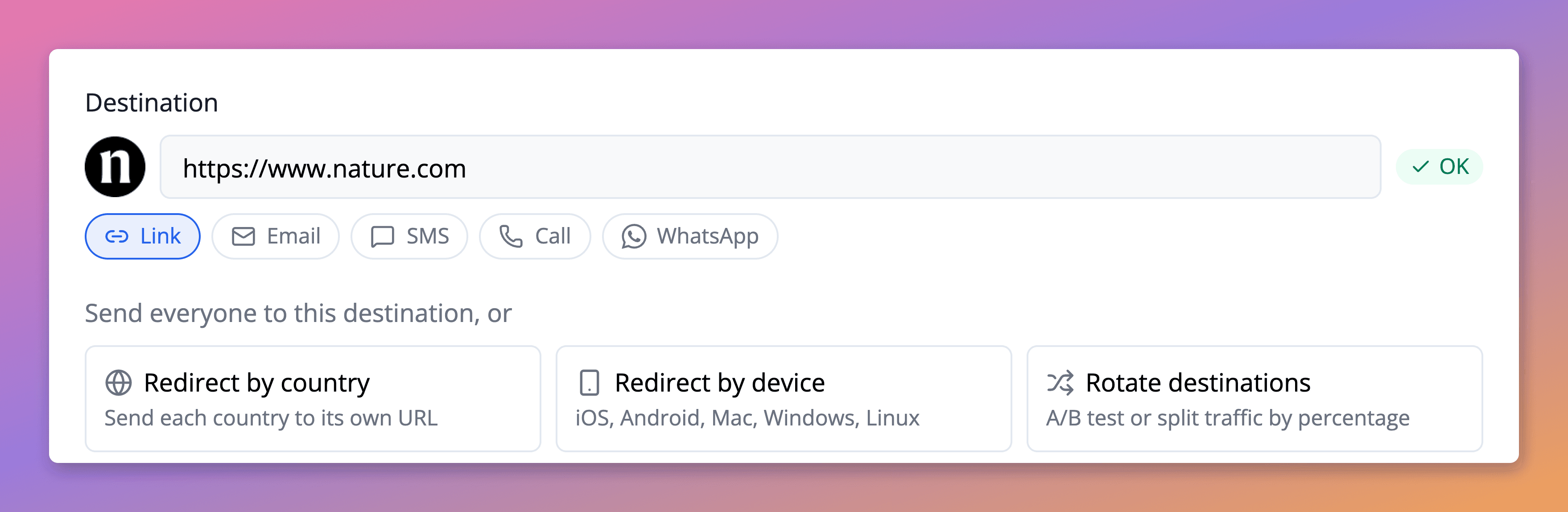
Add the other agents' WhatsApp links.
Give each one a percentage of traffic, or click Distribute evenly to split clicks equally between all of your numbers, including the first.
Any traffic you don't assign goes to the first number, and Linkly shows you the remaining percentage as you edit.
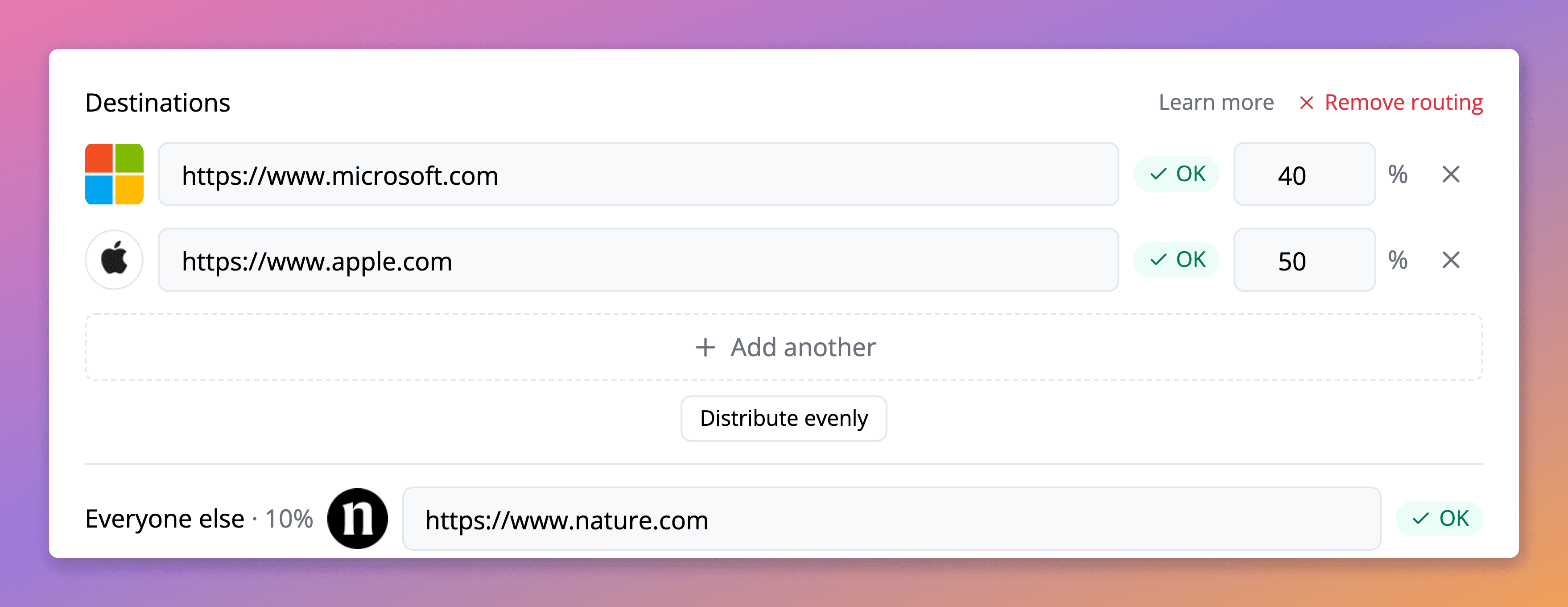
Click Save.
Share this one link wherever customers contact you. Each click opens a WhatsApp chat with one of your agents.
How to create a WhatsApp group rotator
Get your WhatsApp group invite links.
Open each WhatsApp group, tap the group name, scroll to Invite via link, and copy the link.
Each link will look like: https://chat.whatsapp.com/ABC123...
Click Create New Link in Linkly.
Paste your first WhatsApp group link as the Destination.
Under the destination, click Rotate destinations.
Add your additional WhatsApp group links.
Paste each WhatsApp group invite link and assign a percentage of traffic.
For equal distribution across 3 groups, click Distribute evenly, or give the second and third groups 33% each. The remaining 34% goes to the first group.
Optionally rename the Nickname (Linkly fills it in from the page's title) so you can find the link later.
For example, "WhatsApp Community Rotator".
Click Save.
Your WhatsApp rotator is now ready. Share this single Linkly URL everywhere - each click will be distributed to your WhatsApp groups.
Best practices for rotating WhatsApp numbers
Take agents out while they're away
Set an agent's percentage to 0%, or remove their link, while they're off shift, and put it back when they return. The link you've shared stays the same.
Use one rotator per channel
Create a separate rotator for each channel, such as your website and your Instagram profile, and pre-fill a message that names the channel. Agents then know where each chat came from, and Linkly's reports show which channel sends the most enquiries.
Weight your strongest closers
Percentages don't have to be equal. Give experienced agents a larger share, or send a smaller share to a new team member while they're training.
Best practices for rotating WhatsApp groups
Start with fewer groups
Begin with 2-3 groups and add more as they fill up. This keeps your communities active and engaged rather than spread thin.
Monitor group capacity
Use Linkly's analytics to track how many people have been sent to each group. When a group approaches 1,000 members, reduce its percentage or remove it from the rotator.
Update percentages as groups fill
If Group A is at 800 members and Group B is at 200, temporarily set Group A to 20% and Group B to 80% to balance them out.
Use a custom domain
A branded short link like yourname.link/join or yourname.link/chat looks more professional and trustworthy than a generic shortened URL.
Tracking your WhatsApp rotator
Linkly provides detailed analytics for your WhatsApp rotator:
- Total clicks - How many people clicked your link
- Destination breakdown - Exactly how many clicks went to each WhatsApp number or group
- Geographic data - Where the people clicking are located
- Device data - Mobile vs desktop clicks
- Time trends - When people are clicking
View these stats in the Destination tab of your link's traffic report.
Related tools
- Free WhatsApp Link Generator — Quickly create a
wa.meclick-to-chat link with a pre-filled message. No account required. - Tracked WhatsApp Links — Create WhatsApp links through Linkly with full click tracking, analytics, and retargeting.
WhatsApp rotator FAQs
What is a WhatsApp rotator?
A WhatsApp rotator is a single link that sends each click to one of several WhatsApp destinations. Businesses use it to share new chats across their team's WhatsApp numbers, and communities use it to spread new members across several groups when one group reaches WhatsApp's limit of 1,024 members.
Can I rotate WhatsApp numbers as well as groups?
Yes. Add a wa.me link for each number, such as https://wa.me/15551234567, and each click opens a chat with one of those numbers. It works with both WhatsApp and WhatsApp Business.
Does the rotator send chats to agents in strict turn (round robin)?
No. Each click is assigned at random according to your percentages, so a small number of clicks can be uneven. Over a few hundred clicks, each number receives close to its share, and the Destination tab shows the exact count for each one.
Can I stop sending chats to an agent who's away?
Yes. Set their percentage to 0% or remove their link. The change applies to new clicks straight away, and the link you've shared stays the same.
How many numbers or groups can I add to a rotator?
You can add up to 100 WhatsApp links to a single rotator. For more than 100, you can stack rotators together for virtually unlimited capacity.
Will the same person always go to the same number or group?
Not by default. Linkly's rotator is probabilistic, so if someone clicks your link twice, they may be sent to a different number or group each time. To keep a returning person on the same one, edit the link and switch on Remember each visitor's destination. It's remembered in a cookie for 30 days and follows their browser, so a new device or cleared cookies start afresh.
Can I change which numbers or groups are in the rotator later?
Yes. You can add, remove, or change WhatsApp links at any time. You can also adjust the percentage distribution without creating a new link.
What happens when a WhatsApp group is full?
When a group reaches 1,024 members, WhatsApp will prevent new members from joining via the invite link. You should remove full groups from your rotator or set their percentage to 0%.
Can I see how many clicks went to each number or group?
Yes. Linkly's traffic reports show exactly how many clicks were redirected to each destination URL. Check the Destination tab in your link's analytics.
Do I need a paid plan for a WhatsApp rotator?
Rotators are available on the Pro plan and above. See our pricing page for details.
Can I use a custom domain for my WhatsApp rotator?
Yes. Paid plans allow you to use your own custom domain, making your link look like yourbrand.com/chat instead of a generic short URL.
What's the difference between a WhatsApp rotator and a WhatsApp channel?
A WhatsApp Channel is a one-way broadcast feature with unlimited followers. A WhatsApp Group is for two-way conversations but limited to 1,024 members. A rotator helps you scale groups beyond this limit while maintaining the interactive group experience.
Plan availability
Available on Pro and above
Get 100 short links and track 500 monthly clicks for free.