
Ad Analytics
If you send paid traffic through a Linkly link, the Ads tab breaks those clicks down the way your ad platform does — by network, placement, campaign, ad set and ad.
It appears at the end of the tab strip on any traffic report:
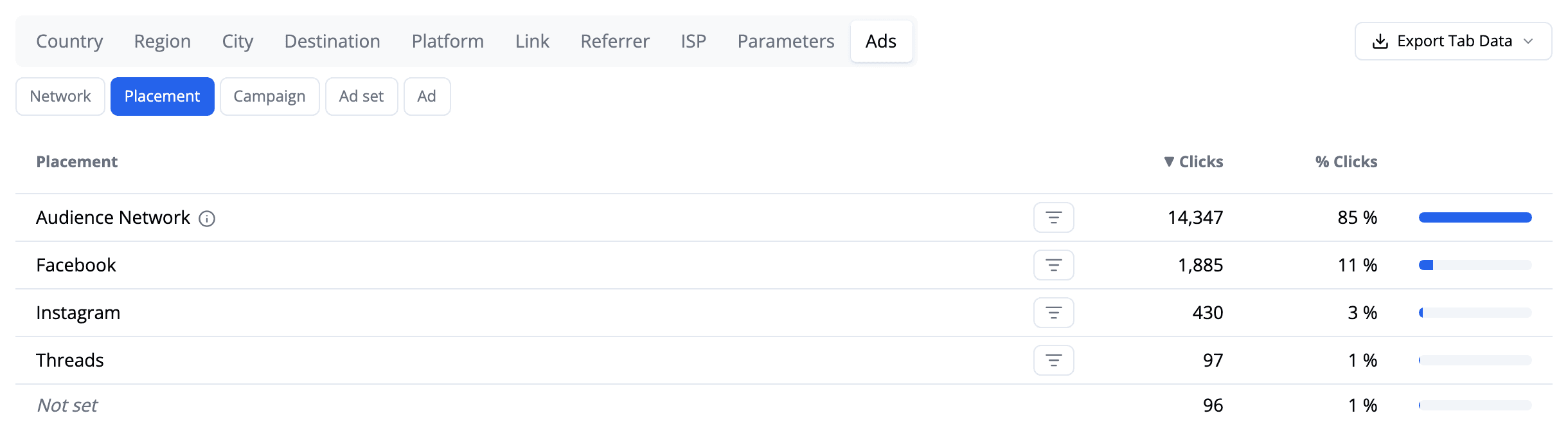
The example above is a Meta campaign where 85% of the clicks came from Audience Network — Meta's inventory inside third-party apps and games, rather than the Facebook or Instagram feeds. That is the sort of thing this tab exists to make obvious.
How Linkly knows a click came from an ad
Ad platforms add their own click identifier to your destination URL automatically — fbclid for Meta, gclid for Google, ttclid for TikTok, msclkid for Microsoft. You don't have to configure anything for this: if the click came from an ad, the identifier is there.
Linkly reads that identifier to work out which platform served the click, which is what the Network dimension shows:

The five dimensions
Use the buttons above the table to switch between them.
- Network — which ad platform served the click, and how much of your traffic wasn't from an ad at all.
- Placement — where inside the platform the ad ran.
- Campaign, Ad set, Ad — your ad account's own structure.
The last four read your UTM parameters, so they only fill in if your ads are tagged (see below). The labels change to match whichever platform you're advertising on, because each one uses the UTMs differently — on Google the last two columns are Ad group and Keyword, since that is what Google puts there.
Click the filter icon on any row to narrow the whole report — every other tab, the graph and the click total — to that campaign, ad set or ad. Click it again, or use the chip at the top of the page, to clear it.
Tagging your ads
Click identifiers arrive on their own. UTM parameters do not — they are a separate setting in your ad account, and until you turn them on the Campaign, Ad set and Ad dimensions will show everything under Not set.
Both platforms below can fill these in automatically, so you never have to tag links by hand.
How to tag your ads so they break down in Linkly
In Meta Ads Manager, edit your ad and open Tracking → URL parameters.
Use Build a URL parameter and add source, campaign, content and term. Meta's defaults map to Placement, Campaign, Ad set and Ad in Linkly.
In Google Ads, open Settings → Campaign URL options and set a tracking template.
Google's ValueTrack parameters fill Campaign, Ad group and Keyword.
Wait for new clicks.
Tagging only applies from the moment you save it — clicks recorded earlier keep whatever they arrived with.
Reading the two "empty" rows
They mean different things, and they are counted differently:
- Not from an ad on the Network dimension — the click carried no ad identifier at all. Organic traffic, email, someone sharing your link.
- Not set on the other four — the click was from an ad, but that particular UTM was missing. Almost always untagged ads rather than a problem with the link.
A large Not set row is worth acting on: it is the share of your ad spend that Linkly can see arriving but cannot attribute to a campaign.
Comparing against your ad platform
Once Linkly detects a network, the Campaign, Ad set and Ad dimensions count only ad clicks, so their percentages are of your paid traffic — the same basis your ad platform reports on. Their totals add up to the Network row.
Expect your ad platform to report slightly more clicks than Linkly. It counts the tap; Linkly counts the arrival, and some taps never complete — the visitor closes the app, loses signal, or backs out mid-redirect. A gap of 10–20% is normal. A much larger one usually means you are comparing different date ranges, or one campaign against a whole account.
Use Export Tab Data to pull any breakdown out as a CSV.
Frequently asked questions
Why is the Ads tab empty?
None of the clicks in the date range carried an ad click identifier or a UTM parameter. If you are running ads, check you are sending them through the Linkly link rather than straight to the destination, and widen the date range.
Which ad platforms are supported?
Meta (Facebook, Instagram, Threads, Messenger, Audience Network), Google, TikTok, Microsoft, LinkedIn, X, Reddit, Pinterest, Snapchat, Amazon, Yandex and Impact are all detected from their click identifiers. Any other platform still appears if your links carry UTM parameters.
What is Audience Network?
Meta's ad inventory inside third-party apps and games, rather than the Facebook and Instagram feeds. It is often a large share of a campaign's clicks. If it converts far worse than your other placements, you can turn it off by switching that ad set from Advantage+ placements to manual placements.
Why don't my campaigns show names instead of numbers?
Meta's default URL template sends campaign, ad set and ad IDs rather than names. If you prefer names, change the URL parameters in Ads Manager to use the name fields instead — new clicks will show them.
Get 100 short links and track 500 monthly clicks for free.