
Webhooks
Webhooks allow you to receive real-time notifications about your links — both when they're clicked and when they're created, updated, or deleted. Linkly sends a POST request to your specified URL(s) with detailed information about each event.
Use cases
- Automation Platforms: Trigger workflows in Make or Zapier when links are clicked
- Custom Analytics: Send click data to your own analytics system
- CRM Updates: Update customer records when they click links
- Slack Notifications: Get notified in Slack when important links are clicked
- Lead Tracking: Track when prospects engage with your links
Tip: For most automation use cases, our Make integration or Zapier integration are easier to set up than custom webhooks. They include instant click triggers powered by webhooks, with no coding required.
How to set up link-level webhooks
Go to Links and click on the link you want to configure.
Scroll down to the Webhooks section.
Enter your webhook URL(s), one per line.
You can add multiple webhook URLs. All URLs will receive the same payload when the link is clicked.
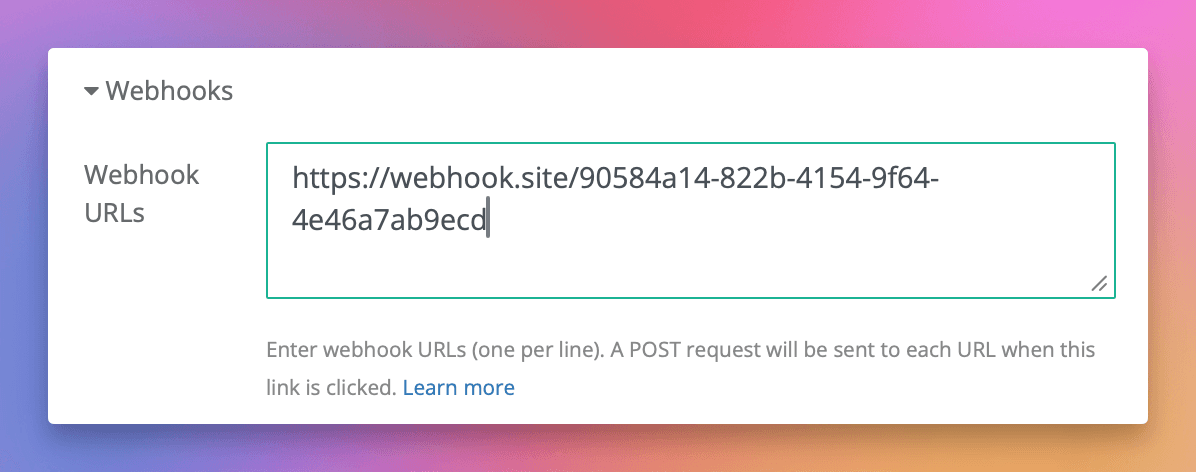
Click Save.
Link-level webhooks only fire when that specific link is clicked.
How to set up workspace-level webhooks
Go to Settings (gear icon in the sidebar).
Click Workspace Settings
Enter your webhook URL(s), one per line.
You can add multiple webhook URLs. All URLs will receive the same payload when any link in your workspace is clicked.
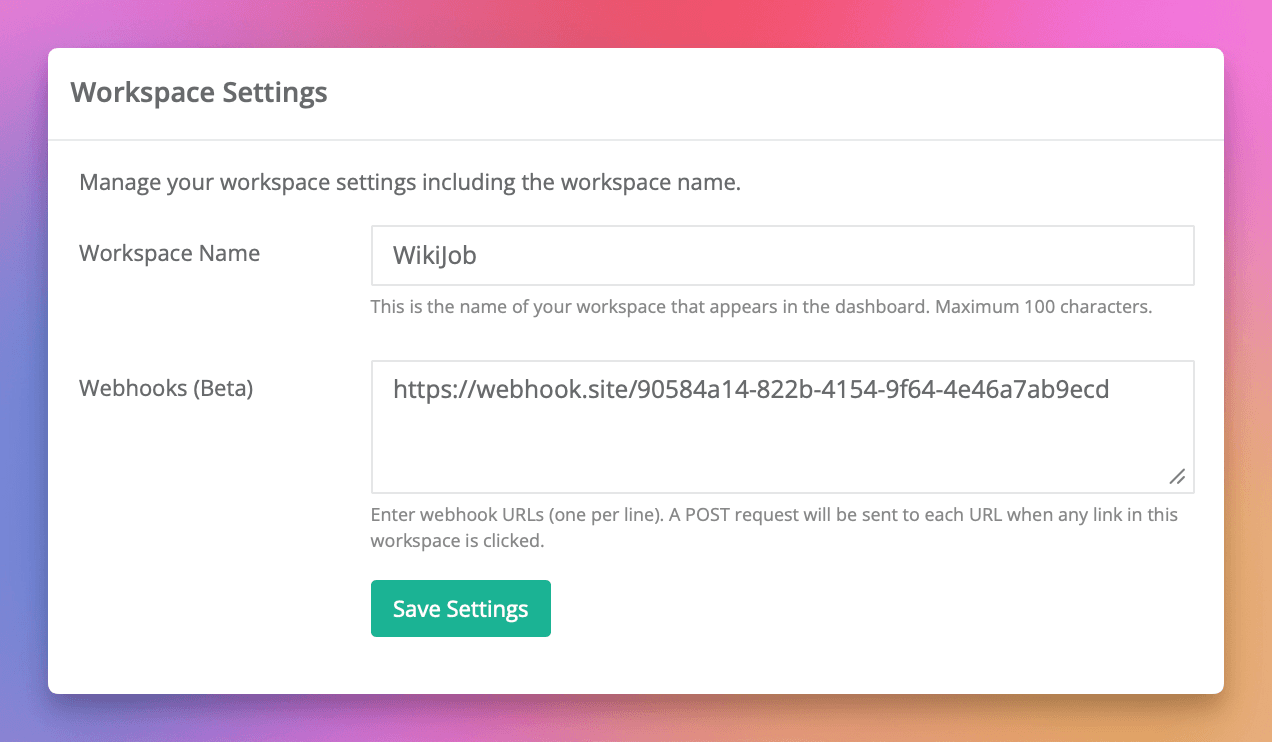
Click Save Settings.
Workspace-level webhooks fire for every click on any link in your workspace.
Note: If you configure webhooks at both levels, both will fire for clicks on that link.
Events
Every webhook receives all event types for its scope — a link-level webhook gets events for that link, a workspace-level webhook gets events for every link in the workspace. Check the top-level event field to tell them apart:
event | Sent when |
|---|---|
click | A short link is clicked. Includes a click object with the visitor's request data. |
link.created | A new link is created in the workspace. |
link.updated | A link's settings change. Fires on every update, including autosaved edits, so you may receive several per editing session. |
link.deleted | A link is deleted. The link object keeps the slug and domain it had before deletion. |
Webhook payload
Click payload
When a click occurs, Linkly sends a POST request with the following JSON payload:
{
  "event": "click",
  "timestamp": "2025-01-15T10:30:00Z",
  "link": {
    "id": 12345,
    "name": "My Campaign Link",
    "url": "https://example.com/landing-page",
    "full_url": "https://yourdomain.com/abc123",
    "domain": "yourdomain.com",
    "slug": "/abc123",
    "destination": "https://example.com/landing-page",
    "workspace_id": 1,
    "enabled": true,
    "cloaking": false,
    "forward_params": true,
    "block_bots": true,
    "public_analytics": false,
    "utm_source": "newsletter",
    "utm_medium": "email",
    "utm_campaign": "spring-sale",
    "og_title": "Special Offer",
    "og_description": "Check out our spring sale!",
    "rules": [
      {
        "what": "country",
        "matches": "US",
        "url": "https://example.com/us-landing"
      }
    ]
  },
  "click": {
    "id": "01KYPGEEPJSPR3S564QRBDGA1W",
    "country": "US",
    "is_eu_country": false,
    "platform": "desktop",
    "browser_name": "Chrome",
    "referer": "https://twitter.com/",
    "isp": "Comcast",
    "bot_name": null,
    "destination": "https://example.com/landing-page",
    "params": {
      "utm_source": "twitter"
    }
  }
}
Payload fields
Event info
| Field | Description |
|---|---|
event | click, link.created, link.updated, or link.deleted |
timestamp | ISO 8601 timestamp of the click |
Link object
| Field | Description |
|---|---|
id | Unique link identifier |
name | Link nickname |
url | Original destination URL |
full_url | The short link URL |
domain | Custom domain (if configured) |
slug | URL path/slug |
destination | Actual destination for this click (may differ from url if rules applied) |
workspace_id | Workspace identifier |
enabled | Whether link is active |
rules | Array of redirect rules (geo, device, rotator) |
utm_* | UTM parameters if configured |
og_* | Open Graph settings if configured |
Click object
| Field | Description |
|---|---|
id | Unique identifier for this click, a 26-character ULID. The leading characters encode the click time, so ids sort chronologically as plain strings |
country | Two-letter country code (e.g., "US", "GB") |
is_eu_country | Whether click originated from EU |
platform | Device platform (desktop, ios, android, etc.) |
browser_name | Browser name (Chrome, Safari, Firefox, etc.) |
referer | Referring URL (if available) |
isp | Internet Service Provider |
bot_name | Bot identifier (null for human clicks) |
destination | Final destination URL for this click |
params | Query parameters passed to the link |
Privacy Note: IP addresses are never included in webhook payloads.
Link lifecycle payload
The link.created, link.updated, and link.deleted events share one shape. There's no click object — you get the event, a timestamp, and the full link:
{
  "event": "link.created",
  "timestamp": "2026-06-20T10:30:00Z",
  "link": {
    "id": 12345,
    "name": "My Campaign Link",
    "url": "https://example.com/landing-page",
    "full_url": "https://yourdomain.com/abc123",
    "domain": "yourdomain.com",
    "slug": "/abc123",
    "workspace_id": 1,
    "enabled": true,
    "rules": []
  }
}
Automation platform integrations
For easier setup without custom coding, use our native integrations:
- Make Integration - Visual automation platform with instant click triggers
- Zapier Integration - Connect Linkly to thousands of apps with no code
Both integrations use webhooks under the hood but handle all the setup automatically.
Best practices
Multiple webhooks
You can add multiple webhook URLs (one per line). All URLs will receive the same payload when a click occurs.
Error handling
- Webhooks are fire-and-forget - Linkly does not retry failed deliveries
- Webhook failures never affect the redirect - users always reach their destination
- Ensure your webhook endpoint responds quickly (< 5 seconds recommended)
Security
- Use HTTPS endpoints for webhook URLs
- Validate incoming requests in your webhook handler
- Consider adding a secret parameter to your webhook URL for verification
Testing
- 1Set up a webhook URL using a service like webhook.site or RequestBin
- 2Click your link
- 3Inspect the received payload
- 4Once verified, switch to your production webhook URL
API access
You can also manage webhooks programmatically via the API:
POST   /api/v1/link/:link_id/webhooks
DELETE /api/v1/link/:link_id/webhooks/:hook_id
GET    /api/v1/link/:link_id/webhooks

POST   /api/v1/workspace/:workspace_id/webhooks
DELETE /api/v1/workspace/:workspace_id/webhooks/:hook_id
GET    /api/v1/workspace/:workspace_id/webhooks
See the API Documentation for details.
Webhooks FAQs
What events can webhooks send?
Webhooks fire on four events, identified by the event field in the payload. You get click when a link is clicked, plus link.created, link.updated, and link.deleted when links change. Every webhook receives all event types for its scope, so branch on the event field to handle each one.
Why aren't my webhooks firing?
Check that your webhook URL is valid and accessible, and that webhooks are saved on the link or workspace. For click events, note that webhooks only fire when a click is actually recorded - excluded IPs or skipped crawlers won't trigger them.
Why are some fields null in the webhook payload?
Some fields may be null if the information wasn't available (e.g., no referer), privacy settings prevented collection, or the click was from a bot (in which case bot_name will be populated instead).
Does Linkly retry failed webhook deliveries?
No. Webhooks are fire-and-forget. Failed deliveries are not retried, and Linkly does not track webhook delivery status. Webhook requests timeout after 5 seconds.
Does Linkly support postbacks for conversion tracking?
No. Linkly webhooks are outbound-only and fire when clicks occur. We cannot receive postback data from affiliate networks or ad platforms. For conversion tracking, use the destination platform's native tracking, pass a click ID via query parameter forwarding, or use our BigQuery integration to join click data with your conversion data.
Should I use webhooks or Make/Zapier?
For most automation use cases, our Make or Zapier integrations are easier to set up. They use webhooks under the hood but handle all the configuration automatically. Use custom webhooks when you need to send data to your own systems or require more control over the integration.
Plan availability
Available on Business and above
Get 100 short links and track 500 monthly clicks for free.