Sticky link rotators: send returning visitors to the same destination
Link rotators can now remember each visitor. Switch on Remember each visitor's destination and anyone who clicks the link again within 30 days goes to the same destination as last time, instead of being drawn afresh on every click.
It's useful for A/B tests where nobody should see both versions, and for sharing leads across WhatsApp numbers or groups so a returning person reaches the same one. Linkly remembers the choice in a cookie on your short link's domain, so it follows the browser rather than the person: a new device, a private window or cleared cookies get a fresh draw.
To turn it on, open a link with Rotate destinations set up and switch on Remember each visitor's destination under its destinations, or set sticky_rotator through the API. It's available on every plan that includes link rotators, it's off by default, existing rotators are unchanged, and it isn't available on links with privacy mode on. The link rotator guide has the details.
Manage DNS records for domains you buy through Linkly
If you bought a domain through Linkly, you can now manage its DNS records yourself. On the Domains page, click the DNS records button next to the Managed badge to see every record and add, edit or remove your own: A, AAAA, CNAME, TXT, MX, CAA and SRV.
That means you can verify the domain with Google Search Console, Google Workspace or Microsoft 365, set up email with MX, SPF, DKIM and DMARC records, or point a subdomain such as www or shop at another service. Long TXT values like DKIM keys are split for you.
The records Linkly needs to serve your short links are marked Managed by Linkly and can't be changed, so you can't break your links by accident. Changes usually take effect within a few minutes. The purchase a domain guide has the details.
Privacy mode: count clicks without collecting personal data
You can now turn on privacy mode for any link or QR code. Clicks are still counted, but nothing that could identify the visitor is kept: no IP address, location, internet provider, referrer or URL parameters. Click times are rounded to the hour.
It's built for links where tracking people is a problem, such as QR codes on patient leaflets, public-sector letters, or any campaign where you've promised not to profile your audience. Click totals, the click chart, browser and device reports and bot filtering all keep working.
To turn it on, open a link, go to Tracking & analytics and switch on Record clicks anonymously. The short link and QR code stay the same, so it works on links you've already printed, and you can still change where the link goes. Tracking pixels, conversion tracking, webhooks and click notifications are switched off for that link, because they would pass on details about the visitor. You can also set privacy_mode through the API.
Privacy mode is available on all paid plans. The short video below walks through it, and the privacy mode guide has the full details.
Unique clicks now count returning visitors once
Someone who comes back to your link later the same day now counts as one unique click, as they always should have.
Since August, the visitor fingerprint behind unique clicks also included details of how the visitor's browser set up its secure connection. Browsers deliberately randomise some of those details every time they connect, so a visitor returning later in the day often looked like someone new. The effect was strongest in Chrome and on Android.
We've taken those details out. The fingerprint is now a one-way hash of the visitor's network address, browser and language setting. As before, there are no cookies, no JavaScript, and nothing is stored on the visitor's device.
Your full click history has been recalculated, so past and future numbers stay comparable. Expect unique counts to fall by around 10% on typical traffic, and by more on links with many returning Chrome and Android visitors. Unique clicks on ad traffic stay close to the click counts your ads manager reports, and total clicks are unchanged.
Stripe app: see which links make sales
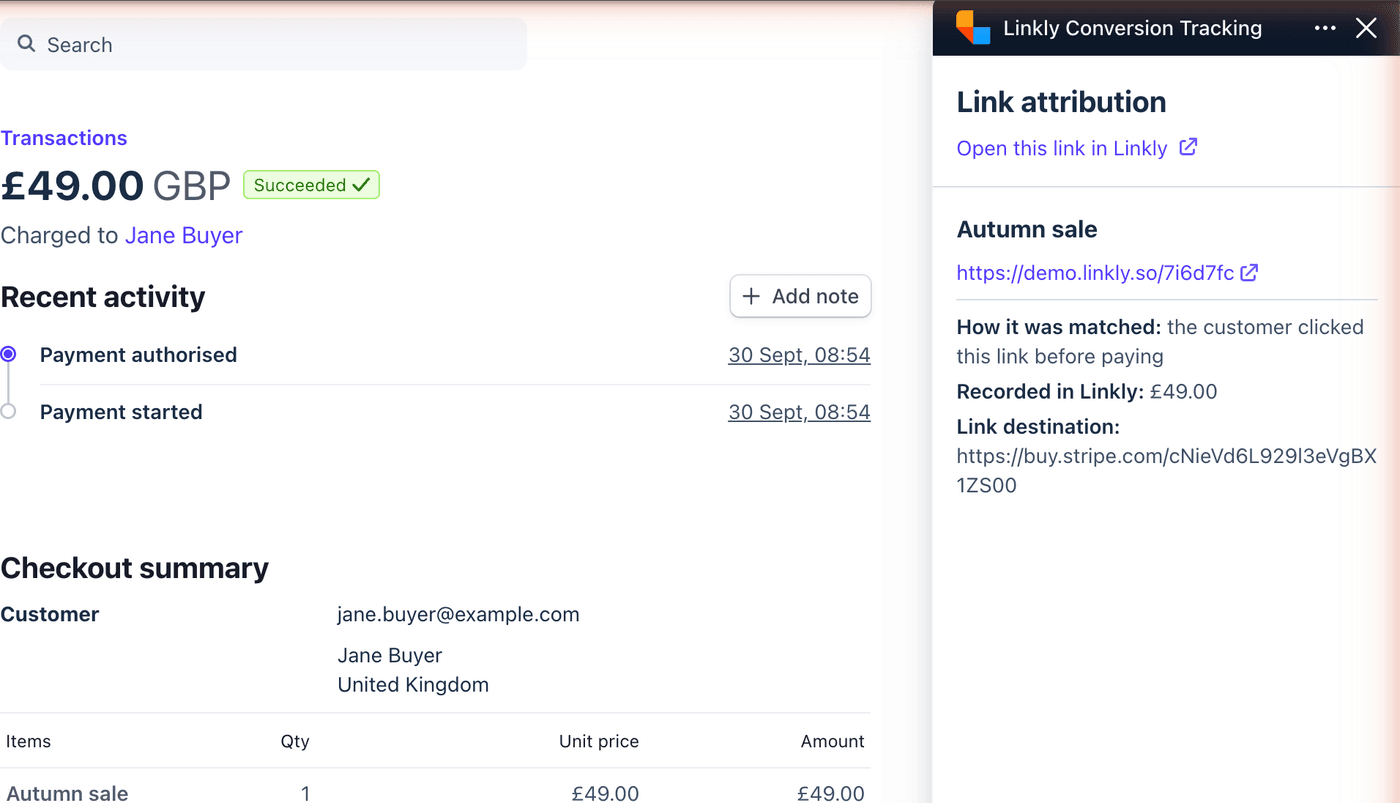
Linkly is now on the Stripe App Marketplace. Install Linkly Conversion Tracking, connect it to your workspace, and every payment that came through a tracked Linkly link is recorded against that link: one-off payments, subscription renewals, and refunds, which are subtracted. Stripe Payment Links need no code at all; for your own checkout, pass the click identifier as client_reference_id. Inside Stripe, each payment shows the short link it came from.
The New Link form now recognises a Stripe Payment Link and tells you how to set this up. Setup steps in Stripe integration.
Add custom domains in bulk
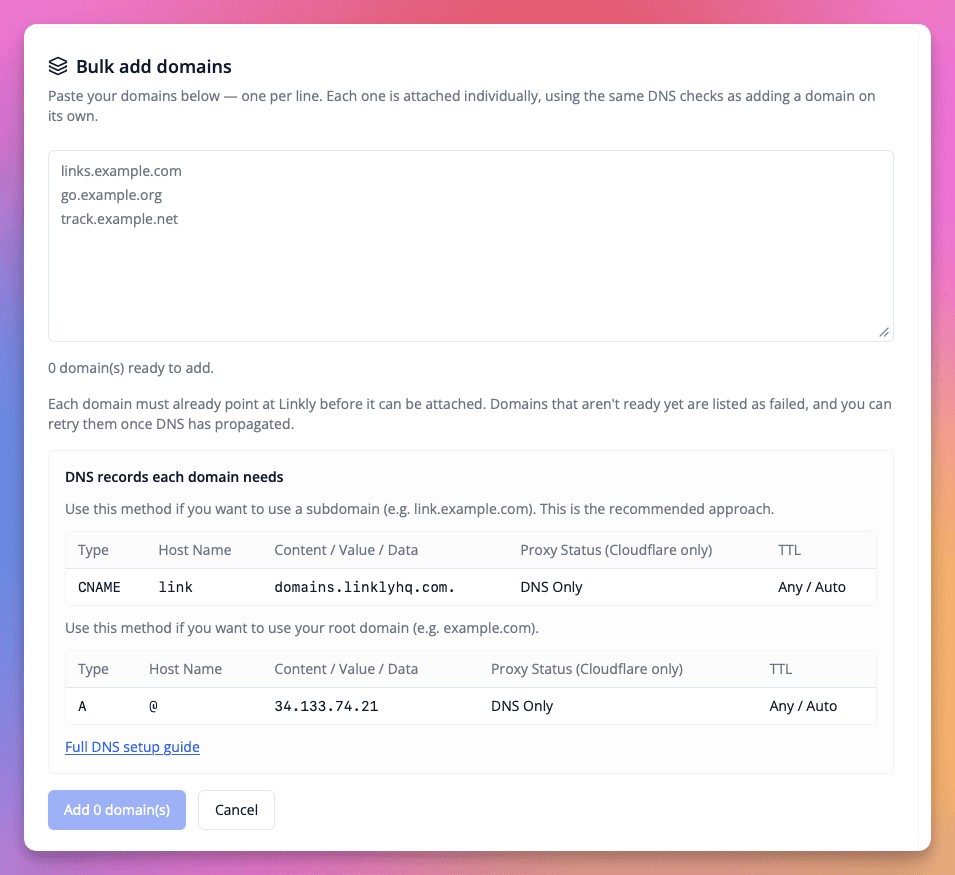
You can now attach many custom domains at once. Go to Domains → Bulk add, paste your list, and Linkly attaches each domain in turn using the same DNS checks as adding one on its own. The records every domain needs are shown right on the page, and any domain that isn't pointing at Linkly yet is listed as failed so you can retry it once DNS has propagated.
Setup details in Custom domains.
See which ads your clicks came from
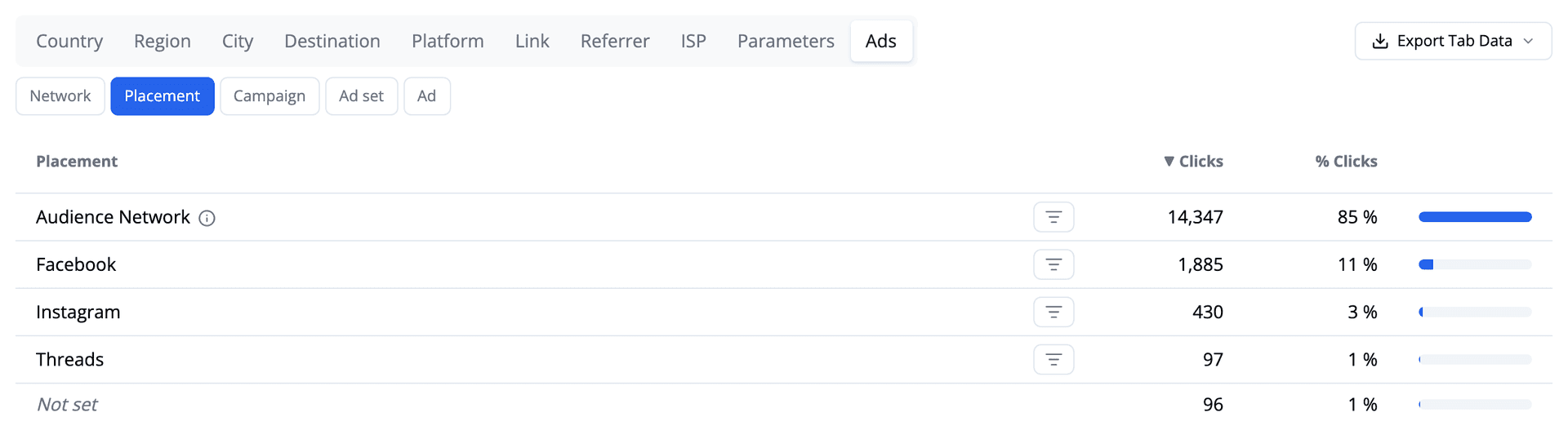
Traffic reports have a new Ads tab. If you send paid traffic through a Linkly link, it breaks those clicks down by network, placement, campaign, ad set and ad.
Network and placement need no setup — ad platforms tag their own clicks, so Linkly can read them straight away. One campaign we looked at was sending 85% of its clicks from Meta's Audience Network: third-party apps and games rather than the Facebook and Instagram feeds.
Full details in Ad Analytics.
Host a PDF with Linkly
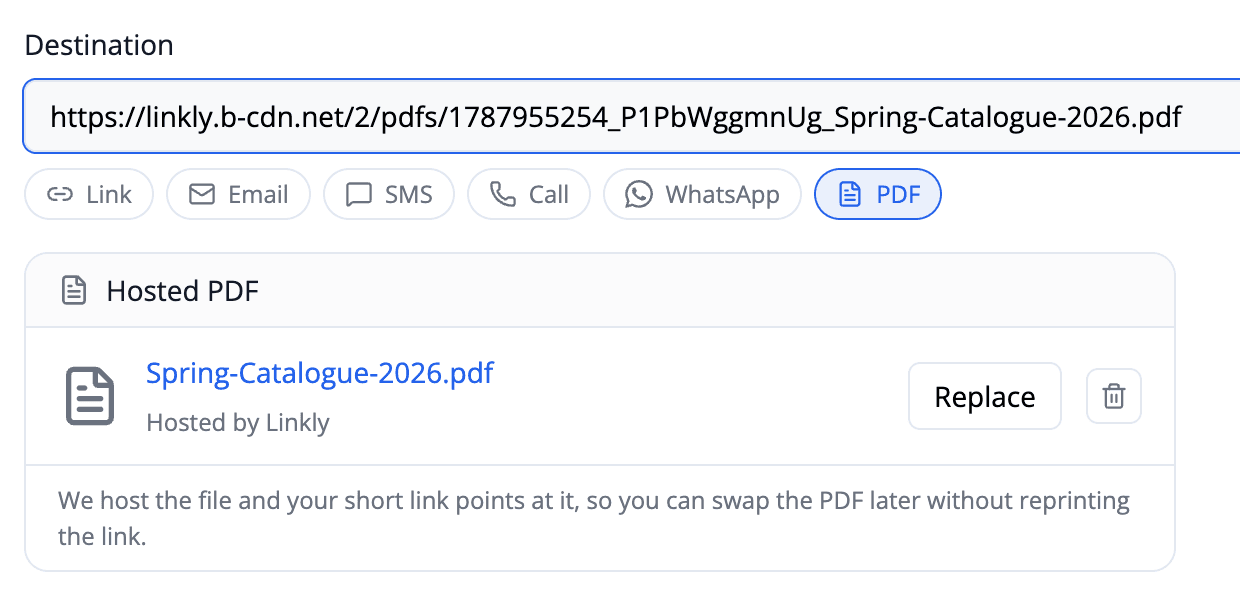
You can now upload a PDF to Linkly and point a short link straight at it — no file host, no cloud storage account, no long unmemorable URL to share. Pick PDF from the link types under the Destination field, choose your file, and save.
The advantage over linking to a file directly is that the short link can be changed and a file URL cannot. Click Replace, upload a new version, and every link and QR code already printed or sent opens the new document. Menus, price lists and timetables stop being a reprinting problem.
Files up to 10MB, included on every plan. Hosted PDFs are public to anyone with the address, which contains a long random string so it can't be guessed — for confidential documents, password-protect or expire the link.
Full instructions are in the PDF to link guide.
Linkly is now in the Claude Directory
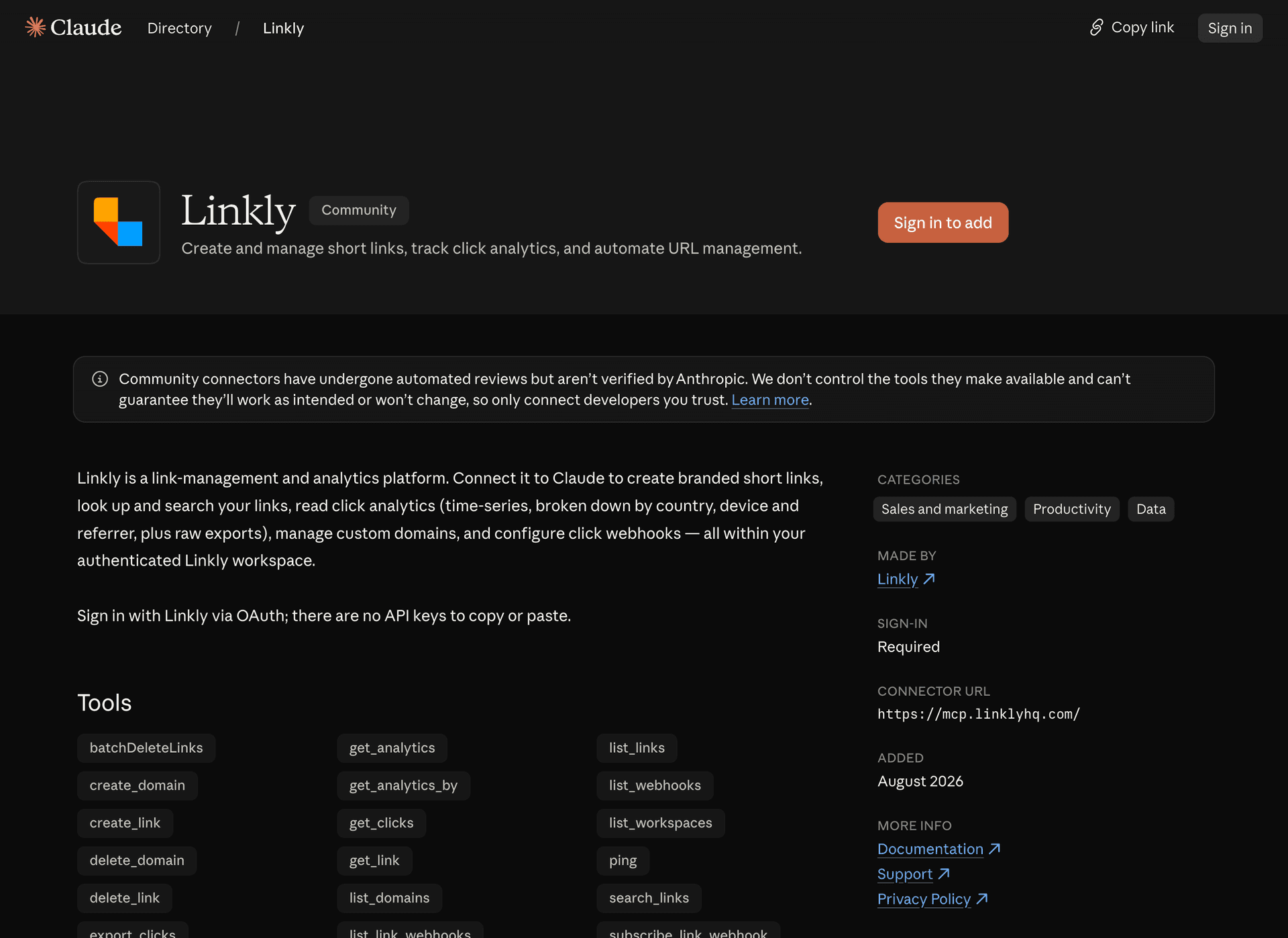
Linkly is now listed in the Claude connector directory, so connecting your Linkly account to Claude takes a couple of clicks — no URLs to paste and no API keys.
Open Linkly's directory page — or search for Linkly in Claude's Directory — and click Connect to Claude. Sign in with your Linkly account, choose a workspace, and you're done.
The listing is a public page, so you can open or share it without a Claude account — handy for showing your team (or your Claude admin) exactly which tools the connector provides before anyone connects it.
What you can do
Once connected, ask Claude to:
- Create links - "Create a short link for https://example.com/spring-sale called Spring Sale"
- View analytics - "Which countries are my clicks coming from this month?"
- Search and update links - "Find my links about the product launch and update the promo one"
- Manage domains and webhooks - "List my custom domains" or "Subscribe my webhook to click events"
Works on every plan
The Claude integration is available on all Linkly plans, including the free plan.
If your organisation has the directory switched off, or you use Claude Code, the manual setup still works — see the updated setup guide.
City and Region in Analytics
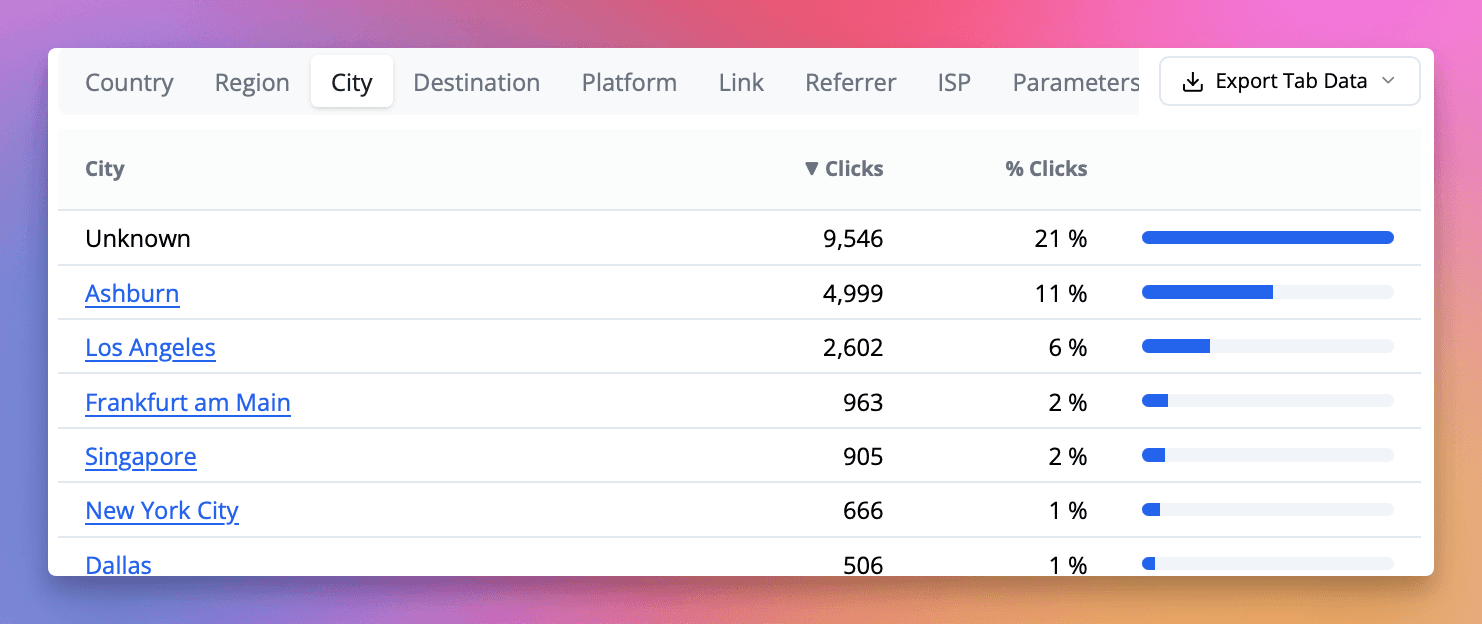
Click analytics now include the city and region a visitor clicked from, alongside the country reporting you already had. It's there wherever location appears — reports, the click list and CSV exports — so you can see which cities a campaign is actually reaching rather than only which countries.
The location data is provided by Cloudflare, which resolves it at the edge as the redirect happens. No extra setup and nothing new to switch on.
Improved Bot Detection
Bot detection now weighs several signals together rather than leaning on where a click came from. That matters most for the growing number of real people who arrive through Facebook and Instagram in-app browsers, mobile carrier proxies and iCloud Private Relay, all of which route traffic through hosting networks. Those visitors are now recognised as the people they are.
Bot blocking is more precise as a result. On links with bot blocking switched on, automation is turned away while genuine visitors on their phones go straight through to your destination.
Detection is sharper on automation too. Headless browsers and tools like Puppeteer, Playwright and Selenium are now recognised, along with crawlers that don't identify themselves — so your click figures rest on stronger signals in both directions.
Three smaller improvements. Skip social crawler tracking now recognises Facebook's crawler on custom domains as well. Each crawler is reported under one consistent name, however your link was served. And a click from a hosting network that we've identified as a real person is labelled Amazon.com (cloud), so it's clear why it appears in your human traffic.
Human Clicks in the Links Dashboard
Your links dashboard can now show human clicks — Today, 30 Day and Total counting real visitors rather than crawlers, link previews and monitoring tools. Open Linkly in a new browser and you'll see them straight away. If you already have your columns set up, nothing changes: your view is left exactly as you had it, and you can add the human figures from the Columns menu whenever you want.
The all-traffic counts stay available as their own columns, so you can show both side by side and see how much of a link's traffic is automated. Traffic reports have worked this way for a while — the links table now matches.
Sparklines follow the same rule. A link whose traffic is entirely automated now simply says "No recent clicks", rather than drawing a chart of crawler activity that looked like real interest.
Unique Clicks Now Count Visitors, Not IP Addresses
Until now, the Unique filter counted one click per IP address per day. On mobile networks that undercounts real people, because carriers routinely put many phones behind a single shared IP address. The effect was largest on ad-campaign traffic — TikTok, Instagram, and similar audiences are almost entirely mobile — where unique counts could sit well below the click numbers your ads manager reported.
Unique clicks are now counted per visitor, using a privacy-preserving fingerprint: a one-way hash of connection characteristics. No cookies, no JavaScript, and nothing stored on the visitor's device. In validation against live TikTok campaigns, unique clicks moved from roughly 30% below the ad platform's own click count to within a few percent of it.
The new counting applies across your full click history, so past campaigns are directly comparable. Expect unique counts to rise — most noticeably on mobile-heavy traffic. Total click counts are unchanged, and the Unique toggle works everywhere it did before: dashboards, reports, the click list, and CSV exports.
Conversion Tracking
Clicks tell you something worked. Conversion tracking tells you what. Switch it on for any link and your dashboard gains Conversions and Revenue columns alongside clicks, so you can see which links bring in signups and sales rather than just traffic.
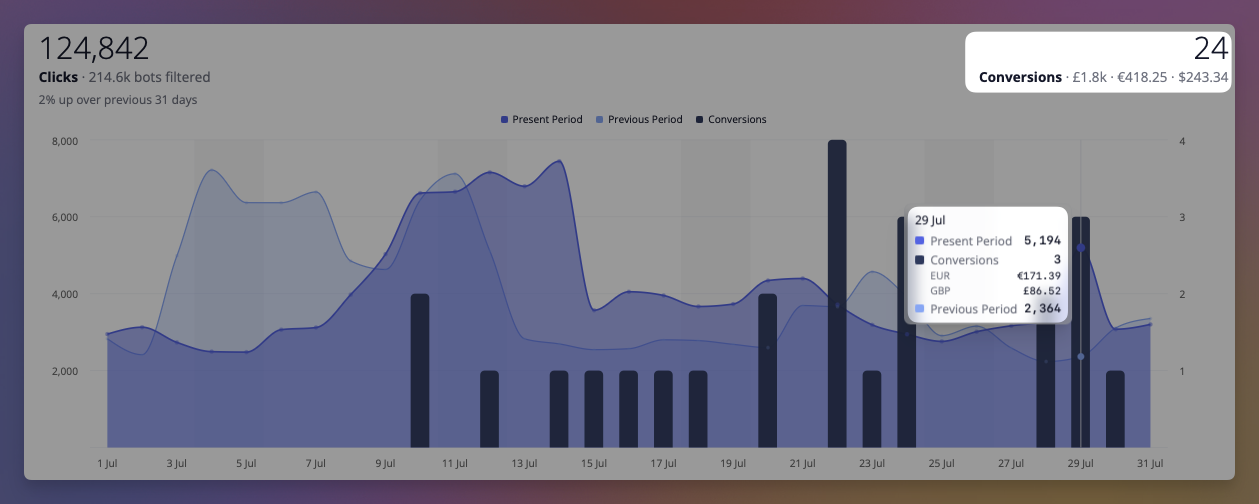
If you already send purchase events to Google Analytics 4, there's nothing to build — add the Linkly script to your site and we read the events you're already sending. No new events, no tagging work. Not on GA4? Report sales yourself in a line of JavaScript, or server-side from your backend.
Turn it on from any link's options, where the script is one click away. It's free on every plan, and currently in Beta — attribution depends on your site as well as ours, so it's worth verifying on your own setup before you rely on the numbers.
Human Clicks by Default
Your traffic reports now show human clicks by default. Around a third of all link clicks come from bots — social previews, spam scanners, search crawlers — and they're now filtered out of your headline numbers automatically, so your analytics reflect real visitors.
You'll see how many bots were filtered next to your click count (for example, "1,240 clicks · 380 bots filtered"), and a new Include bot traffic toggle reveals the full picture whenever you need it. The API is unchanged — reports there still include all traffic by default.
Linkly now speaks 5 more languages
Linkly's site and help content are now available in five more languages: Arabic, Indonesian, Vietnamese, Turkish, and Thai — bringing us to 17 languages in total.
Arabic is our first right-to-left language, so the entire interface mirrors to match, with proper Arabic typography throughout.
Switch languages from the globe menu in the navigation bar, or jump straight to a localized page — for example /id/pricing or /tr/features/smart-links.
Open links directly in apps
Links can now open inside a native app instead of a mobile browser. Paste an Amazon product, a YouTube video, or a Spotify track and switch on Open in app — Linkly recognises the app and fills in the technical settings for you, with an automatic fallback to the app store or website if the app isn't installed.
It works from the places where links usually break out to a limited in-app browser, like the link in bio on TikTok and Instagram — and it stays out of the way everywhere else, so your phone's built-in app handling keeps working normally. No SDK and no changes to the destination app required.
Popular apps like Amazon, YouTube, Spotify, Instagram, TikTok, and many more are recognised automatically, and you can set up any other app by hand.
Retiring l.linklyhq.com for free plans
We've retired the l.linklyhq.com short domain for free plan users. This domain was offered historically and hasn't been available for new links since 2024. Visitors to a free plan link on this domain will now see a "gone" error.
Paid and enterprise customers are unaffected: existing l.linklyhq.com links keep working, though no new links can be created on the domain.
If you're on a free plan and still using l.linklyhq.com, we recommend migrating your links to linkly.link or connecting your own custom domain.
Restore deleted links
Deleted a link by mistake? You can now bring it back yourself. Open the Bulk menu on your links dashboard and choose Restore Deleted to see everything you've deleted, then select the links you want and click Restore — no need to contact support.
Restored links keep their original short URL and settings, so any QR codes or campaigns pointing at them start working again straight away. If a link's short URL has since been reused by a newer link, we'll skip that one and let you know.
Linkly is now an official ChatGPT app
Linkly is now an official app in ChatGPT. Find it in ChatGPT's app directory — no custom setup or config files — and create branded short links, generate QR codes, and check your click analytics right inside the conversation.
What you can do
Connect your workspace once, then just ask ChatGPT to:
- Shorten a URL — "Shorten https://example.com/my-long-page"
- Create a QR code — "Make a QR code for my website"
- Check analytics — "How many clicks did my last link get, and from which countries?"
- Manage links — "List my recent links" or "Update that link's destination"
It works on ChatGPT web and mobile, and signs in securely with your Linkly account via OAuth — the model never sees your credentials.
See the ChatGPT integration guide to get started.
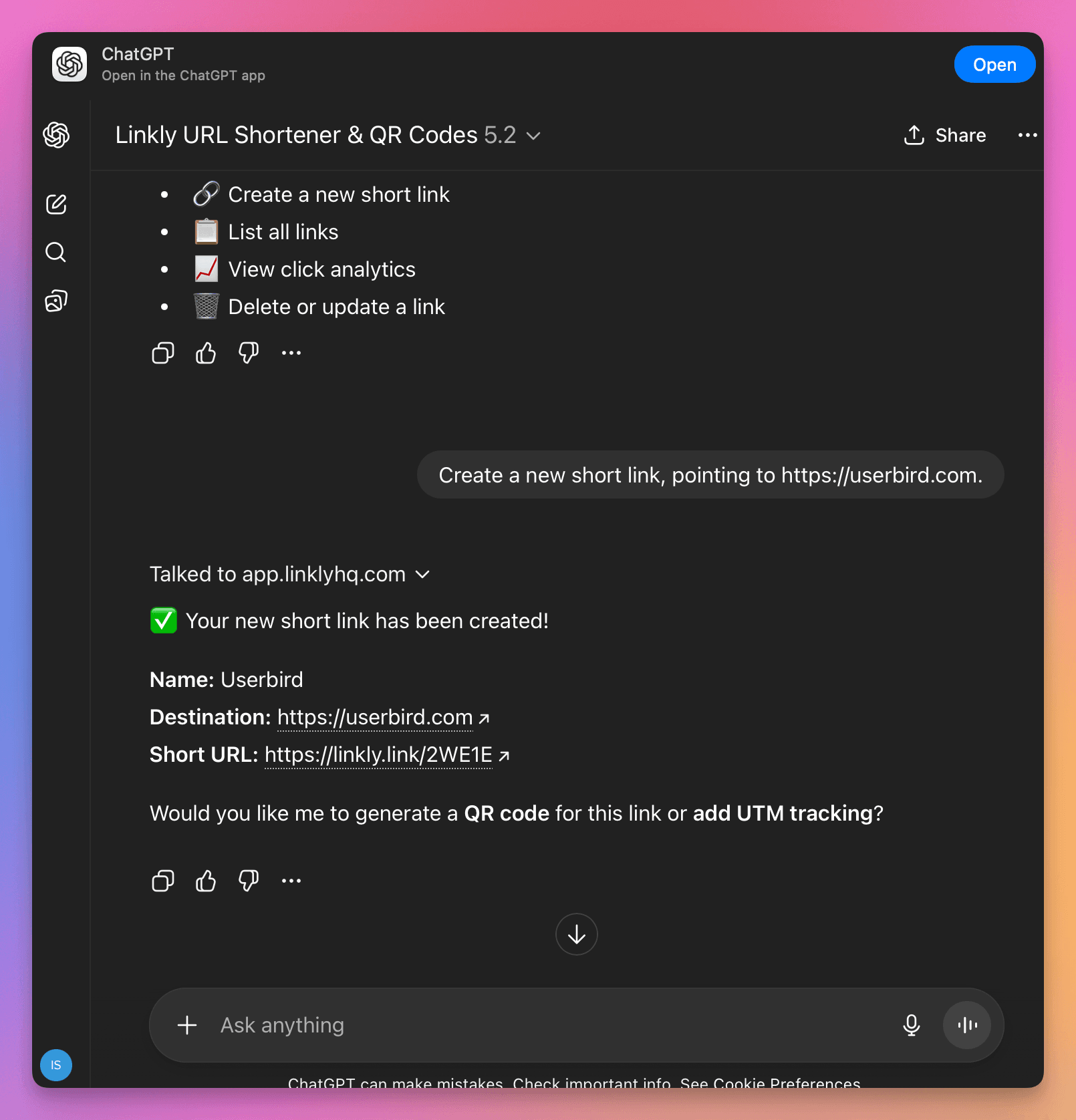
Export QR codes in bulk
You can now download QR codes for many links at once. Select the links on your dashboard, open the Bulk menu, and choose Export QR Codes — as PNG (full colour, with your logo and styling) or SVG (vector, ideal for print). Linkly renders every selected link's QR and hands you a single zip, with a progress indicator for larger batches.
PNG exports keep each link's saved colours, eye styles, and logo, so bulk output matches what you'd get downloading a single link. See creating QR codes for more.
More keyboard shortcuts
We've expanded Linkly's keyboard shortcuts so you can do more without reaching for the mouse. Press ? on any screen to see every shortcut available there — a quick reference, right where you are.
There are new single-key actions on a link's details page: edit (e), duplicate (d), open the destination (o), copy the short link (c), or jump to its clicks (r). The dashboard shortcuts you already know — ⌘K to search and ⌘↵ to create a link — work just as before.
View the full list in the keyboard shortcuts reference.
Sign in with Microsoft
You can now sign up or log in to Linkly with Sign in with Microsoft. One click with your personal Microsoft account or your Microsoft 365 work or school account, and you're in — no password to remember.
It sits right alongside the Google and email options on the sign-up and login screens, so you can use whichever account you already have. Faster sign-in, one less password, now with Microsoft.
Webhooks for Created, Updated & Deleted Links
Webhooks now fire on more than just clicks. Subscribe at the link or workspace level and you'll receive a POST whenever a link is created, updated, or deleted — each identified by an event field (link.created, link.updated, link.deleted) alongside the existing click event.
This makes it easy to keep your own systems in sync as your links change. See the webhooks documentation for the payload format.
Six new retargeting pixels: LinkedIn, X, Pinterest, Microsoft, Snap & Reddit
We've added six new advertising pixels you can fire from your links — LinkedIn, X (Twitter), Pinterest, Microsoft Advertising, Snap, and Reddit — and brought every pixel together in a redesigned Tracking scripts & audience pixels panel.
Pick a platform, paste your ID, and save. When someone clicks the link, the pixel fires automatically before they're redirected — so you build retargeting audiences and analytics from every click, with no tracking scripts to copy and paste.
Linkly now supports ten platforms:
- Meta Pixel
- TikTok Pixel
- Google Analytics (GA4)
- Google Tag Manager
- LinkedIn Insight Tag
- X (Twitter) Pixel
- Pinterest Tag
- Microsoft Advertising (UET)
- Snap Pixel
- Reddit Pixel
Use any combination on the same link — they fire everywhere your Linkly links resolve, including custom domains.
See 'Retargeting & tracking pixels' for the full guide.

Analytics API Limits Vastly Improved
We've significantly increased the Analytics API limits for all plans, including Free.
The biggest change is to data scanned — the limit has been raised by a large multiple across every plan, meaning you can run much larger queries and export far more data before hitting a limit.
These improvements apply automatically to your account — no action needed.
For full details, see the Analytics API documentation.
Privacy Policy & Terms Update
We've updated our Privacy Policy and Terms & Conditions to clarify how we use account activity data for customer communications, and to disclose that we use AI for this purpose. Read the updated policies.
Improved API documentation
We've rebuilt our API reference with Scalar for a faster, cleaner experience — complete with interactive examples and ready-to-copy code snippets in over 20 languages.
Explore it here: linklyhq.com/url-shortener-api-reference
Linkly CLI
The Linkly CLI is now available. Install it with npm and manage your short links, click analytics, custom domains, QR codes, and webhooks directly from your terminal.
npm install -g @linkly-link-shortener/cli
linkly auth login
Sign in with OAuth (browser) or an API key — credentials are saved locally so you only authenticate once. Add --json to any command for machine-readable output, or run linkly schema to print the full command tree for use with AI agents and scripts.
Slack Click Notifications
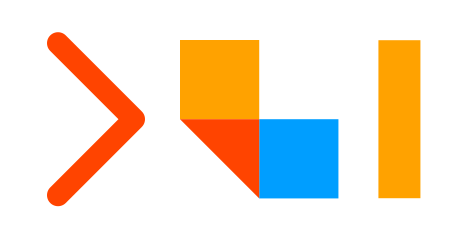
Click notifications are now available in Slack. Install the Linkly Slack app, run /linkly notify in your channel, then toggle Send to Slack on for any link — the bot will post a message whenever that link is clicked.
Notifications include the link name, short URL, country, browser, and a link straight to the analytics dashboard. Debouncing applies as normal: at most one notification per link every 15 minutes, and bot clicks are excluded.
After installing, the setup page walks you through the next step: run /linkly notify in your chosen Slack channel to activate notifications. You can also type /linkly in Slack at any time to see all available commands.
Linkly for Slack
Create branded short links, check click stats, and grab QR codes — without leaving Slack.

What's in it
/shorten <url>— create a branded short link in one command. Add<domain>/<slug>to pick the exact short URL./clicks <domain/slug>— see total clicks and last-7-day stats, with a button into the full analytics dashboard./qr <domain/slug>— get a scannable QR code rendered right in the channel.- App Home — at-a-glance view of your connected Linkly workspace, default short-link domain, and dashboard shortcuts.
Three minimal bot scopes: commands, chat:write, im:write. No message-history or DM-history access.
Full details: Slack integration docs.
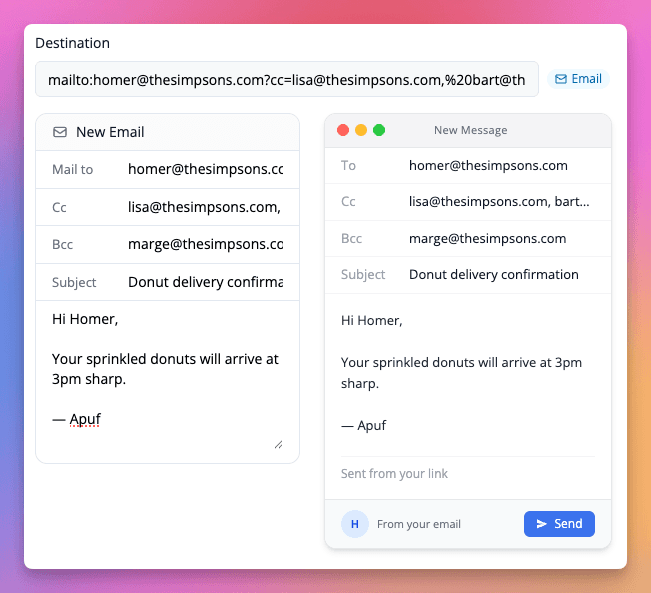
CC and BCC for mailto links
Linkly's mailto link generator now supports CC and BCC fields alongside the existing subject and body. Add multiple recipients to a single shortened mailto link without hand-crafting the URL syntax.
New pricing plans
We've refreshed our pricing with four clearer tiers — Starter, Pro, Business, and Enterprise — priced by links/month with a tracked-clicks quota for analytics. Pro and Business now also support per-resource add-ons (extra clicks, links, domains, or seats) so you can extend a single thing without bumping plans.
Existing customers are grandfathered. If you're already paying for Linkly, nothing changes — you keep your current plan and pricing for now.
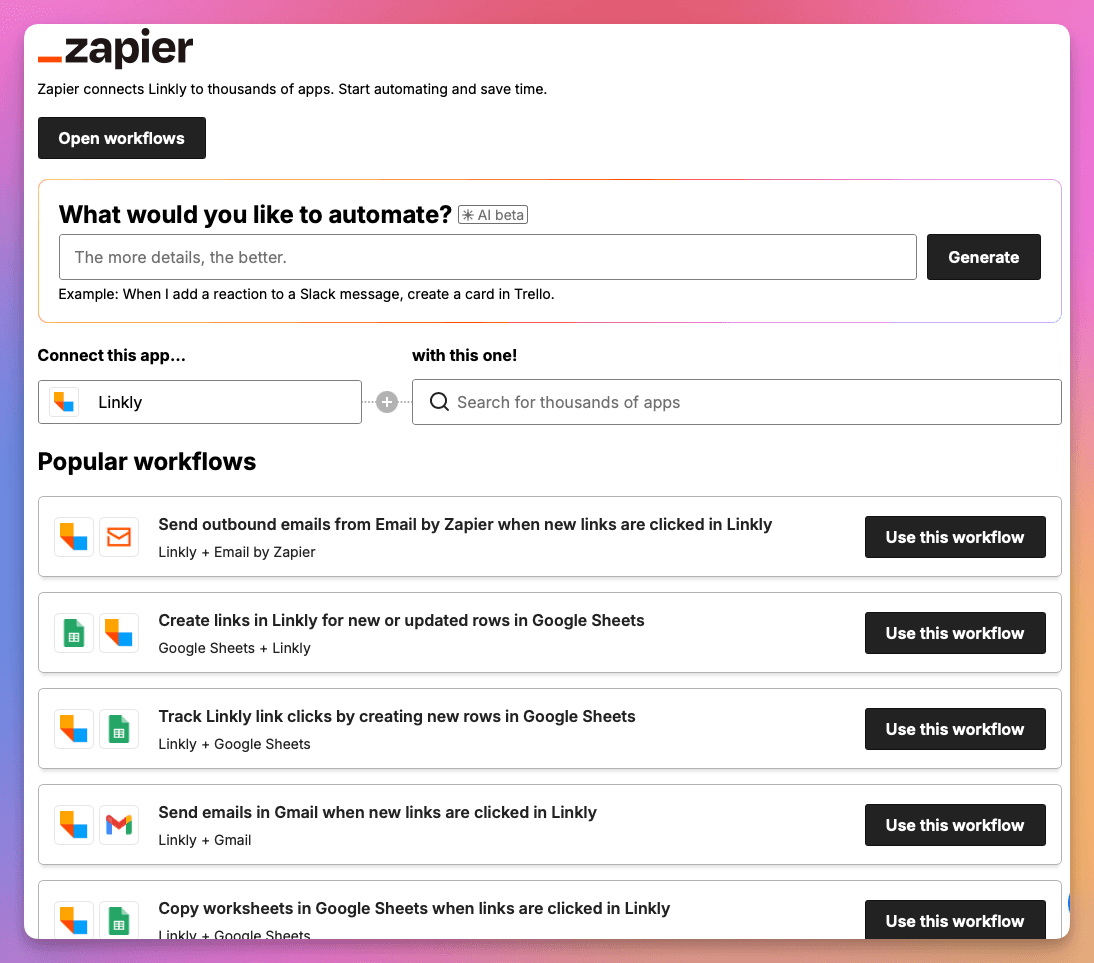
Zapier templates inside Linkly
You can now browse and install Linkly's Zapier integrations directly from the Linkly dashboard at Integrations → Zapier — no need to leave for zapier.com.
We've also added new Zap templates for Google Sheets, Slack, RSS, WordPress and Mailchimp, covering the most-asked-for workflows: shortening URLs in bulk, getting Slack alerts on link clicks, and logging click data to Google Sheets.
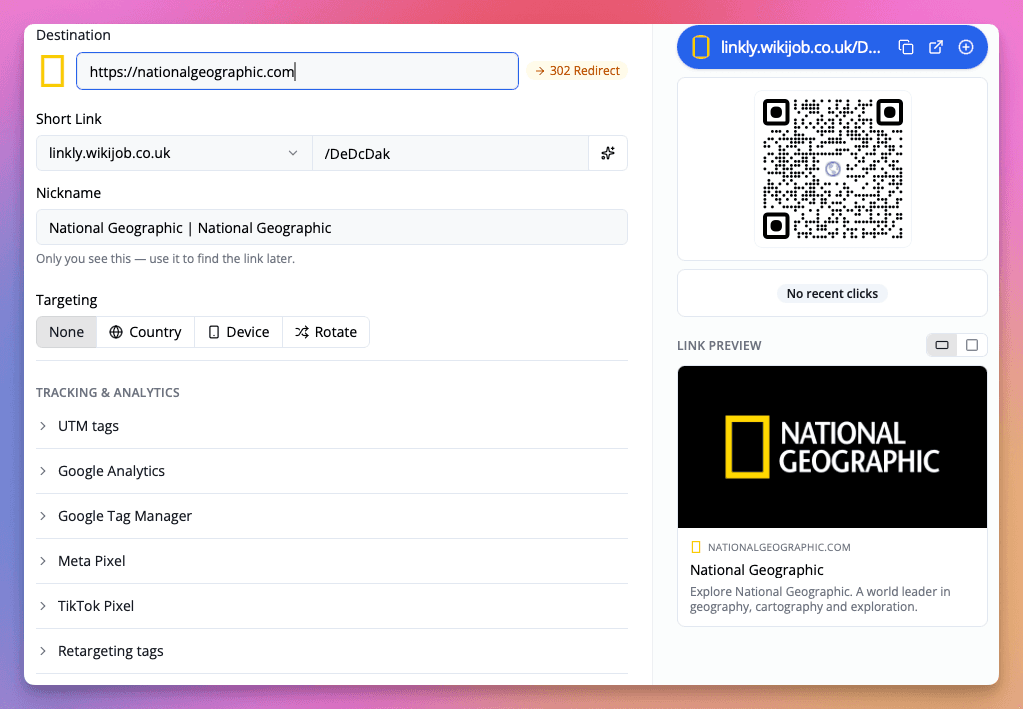
Link Previews and a Cleaner Layout in the New Link Form
The new link form now shows a live preview of the destination page — title, description, and favicon — pulled in as soon as you paste a URL. Use it to confirm you've got the right page before you share the link.
We've also reworked the layout to be easier to scan: the destination, short link, and nickname sit together at the top, with targeting and tracking & analytics options grouped underneath. The QR code, recent clicks, and link preview now share a single side panel.
Linkly for ChatGPT
Linkly is now available as a ChatGPT app — the easiest way to create short links, QR codes, and check analytics without leaving your conversation.
What You Can Do
Once connected, just ask ChatGPT to:
- Shorten URLs - "Shorten this URL: example.com/my-long-page"
- Create QR codes - "Make a QR code for my website"
- Track clicks - "How many clicks did my last link get?"
- Manage links - "List my recent links"
Getting Started
Open go.linklyhq.com/chatgpt, sign in to your Linkly account when prompted, and start chatting.
This is now our recommended way to use Linkly with ChatGPT. See the full setup guide for more.
Improved OAuth Flow for Claude's MCP Server
We've revamped how AI assistants connect to the hosted Linkly MCP server at https://mcp.linklyhq.com. The new flow uses OAuth 2.1 with PKCE and dynamic client registration — there's no API key to paste into a config file anymore.
When Claude Desktop, Claude Code, or any other MCP-compatible client connects for the first time, a browser window opens asking you to sign in to Linkly and approve access. After that, your assistant stays connected with a workspace-scoped token, and the model itself never sees your credentials.
For Claude Desktop, the config is now just:
{
  "mcpServers": {
    "linkly": {
      "command": "npx",
      "args": ["-y", "mcp-remote", "https://mcp.linklyhq.com"]
    }
  }
}
See the updated setup guide for full instructions.
Browser Push Notifications
Click notifications can now be delivered as browser push notifications in addition to email. Push notifications appear instantly on your desktop or mobile device, even when Linkly isn't open in a tab.
To enable push notifications, go to Account Settings and toggle on Browser Notifications. Once enabled, any link with click notifications turned on will also send push notifications to your device. Clicking a notification takes you directly to that link's traffic report.
Push notifications work in Chrome, Safari, Firefox, and Edge. They use the same 15-minute debouncing as email notifications. Learn more about click notifications.
TikTok Pixel Integration
You can now add a TikTok Pixel to your links with a dedicated Pixel ID field — no need to paste the full tracking script manually.
In the link editor, expand the TikTok Pixel section, enter your Pixel ID, and save. When someone clicks the link, the TikTok Pixel fires automatically before they're redirected to the destination.
This works alongside the existing Meta Pixel and Google Analytics integrations. You can use all of them on the same link.
See 'Add TikTok Pixel to a Link' for the full guide.

Use Site Icons as QR Code Logos
You can now use the destination website's icon as your QR code logo with a single click.
In the QR code editor, next to the Upload button in the Logo row, you'll see a small icon showing the favicon of your link's destination. Click it to instantly set it as the QR code logo — no need to download and re-upload the image yourself.
This makes it quick and easy to create branded QR codes that match the destination site.

WhatsApp Link Generator
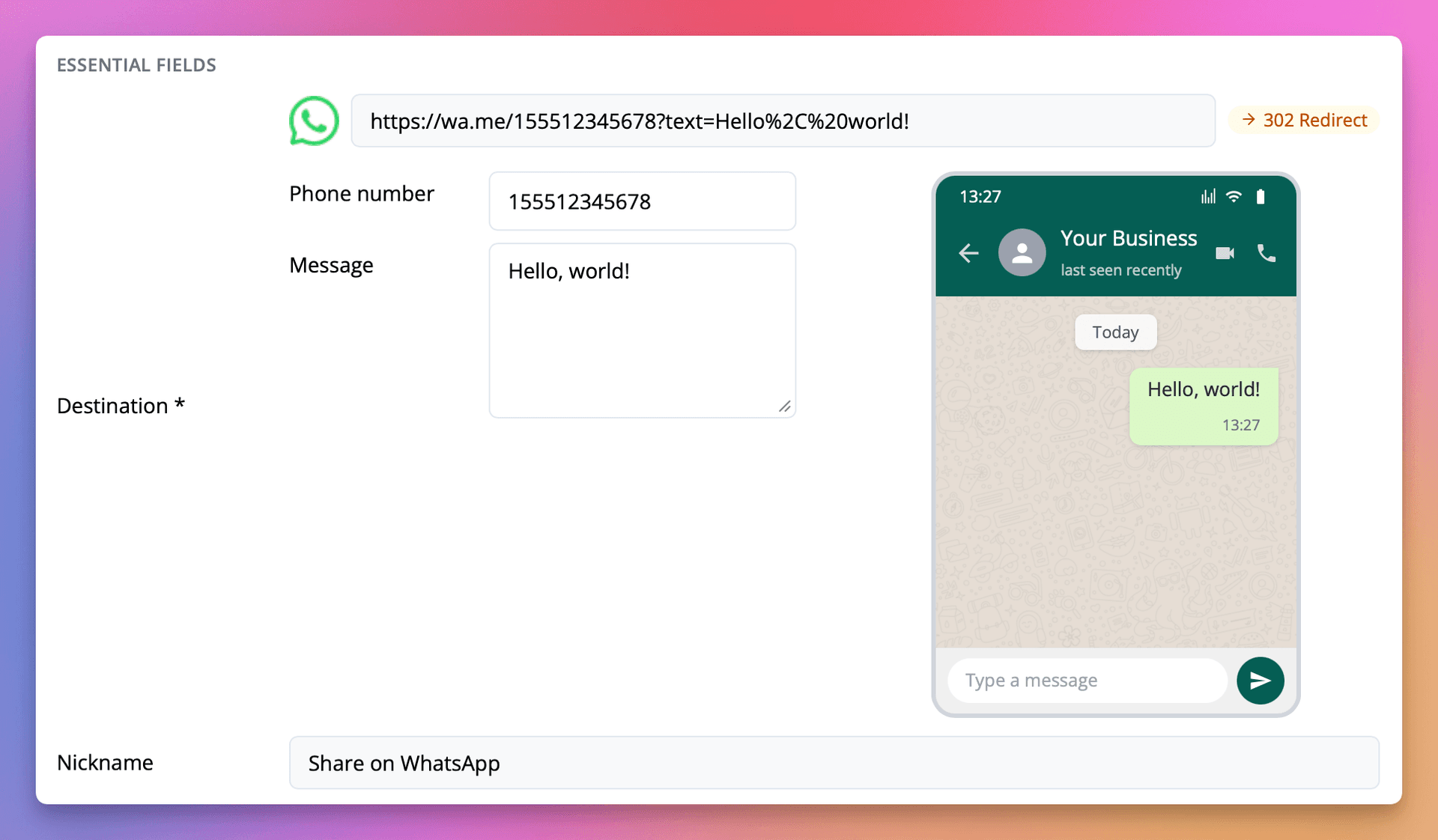
You can now create and edit WhatsApp click-to-chat links directly in the Linkly link editor.
When you paste a wa.me URL into the destination field (or just type wa.me), a form pops out with separate Phone number and Message fields, along with a live preview showing how the message will appear in WhatsApp.
This means you can:
- Edit the phone number and message without manually URL-encoding the
textparameter - See a live preview of the WhatsApp chat as you type
- Track every click with full Linkly analytics — location, device, referrer, and more
All existing Linkly features work with WhatsApp links, including custom domains, retargeting pixels, UTM tags, expiry dates, and A/B rotation.
See 'WhatsApp Link Generator' for the full guide.
Automatic DNS Setup with Domain Connect
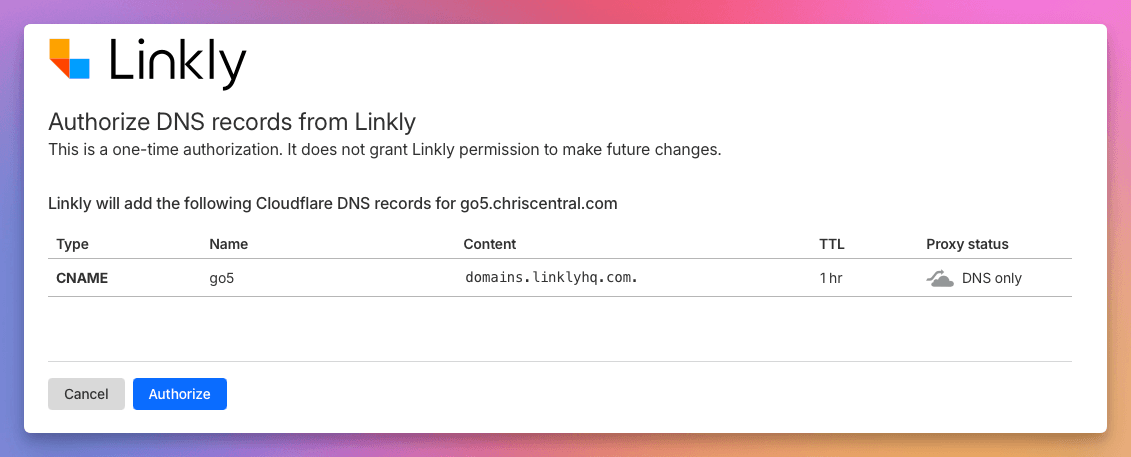
Linkly now supports the Domain Connect protocol, allowing you to set up custom domain DNS records automatically with a single click.
When adding a domain in the wizard, if your DNS provider supports Domain Connect, you'll see an Auto-Configure option. Click it, authorize the changes at your provider, and Linkly will set up the correct CNAME or A records for you — no manual DNS editing required.
Supported DNS providers include:
- Cloudflare
- GoDaddy
- IONOS
- NameSilo
- Plesk
- WordPress.com
For more details, see our custom domain setup guide.
Public URL Shorteners Upgraded to Cloudflare
Today we have upgraded our public URL shorteners on the URLs, linkly.link, 2ly.link and 3ly.link to our new infrastructure on Cloudflare workers.
This is a dramatic upgrade which should reduce global redirect times and increase capacity for traffic surges.
Link icons are now available as an optional column in the dashbaord
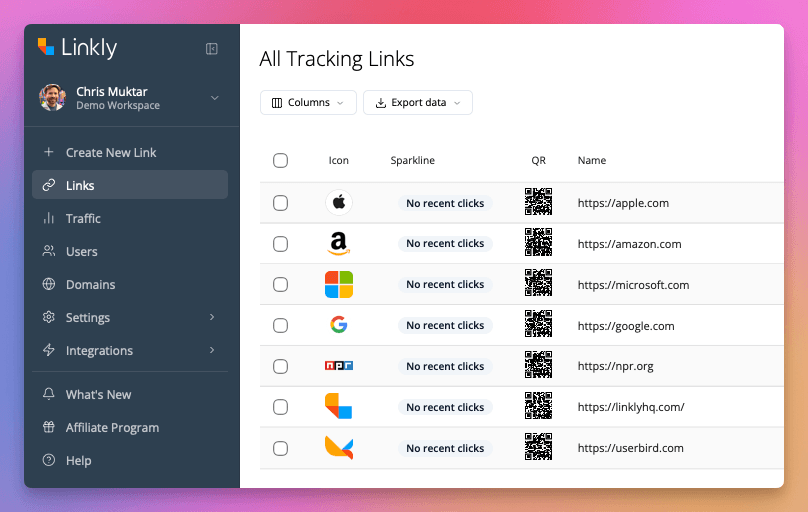
Link icons are now available as an optional column in the dashboard. This allows you to see at a glance the icon of the link's destination. This only works if the destination provides an icon.
Icons are also shown when detected when entering URLs.
QR Code Generator API
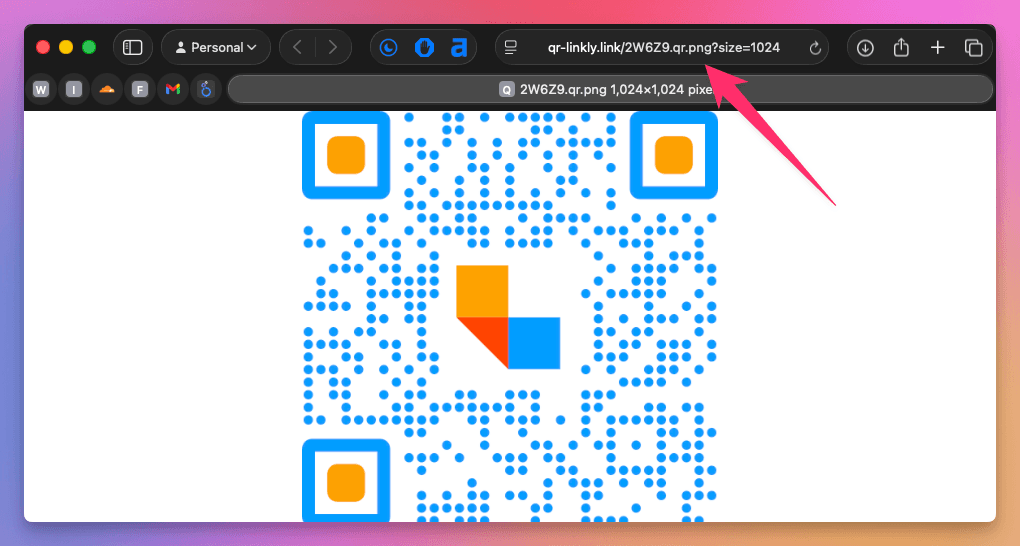
You can now access QR code images directly via URL by appending .qr.png to any short link. For example:
https://lnk.ly/ABC123.qr.png
This returns a PNG image of the QR code, complete with any saved styles, colors, and logos. No authentication is required, making it easy to embed QR codes in emails, documents, or webpages using a simple <img> tag.
For developers who need more control, an authenticated API endpoint is also available at /api/v1/link/:id/qr/png, which supports query parameter overrides for colors, styles, and size.
See 'QR Code Generator API' for full documentation.