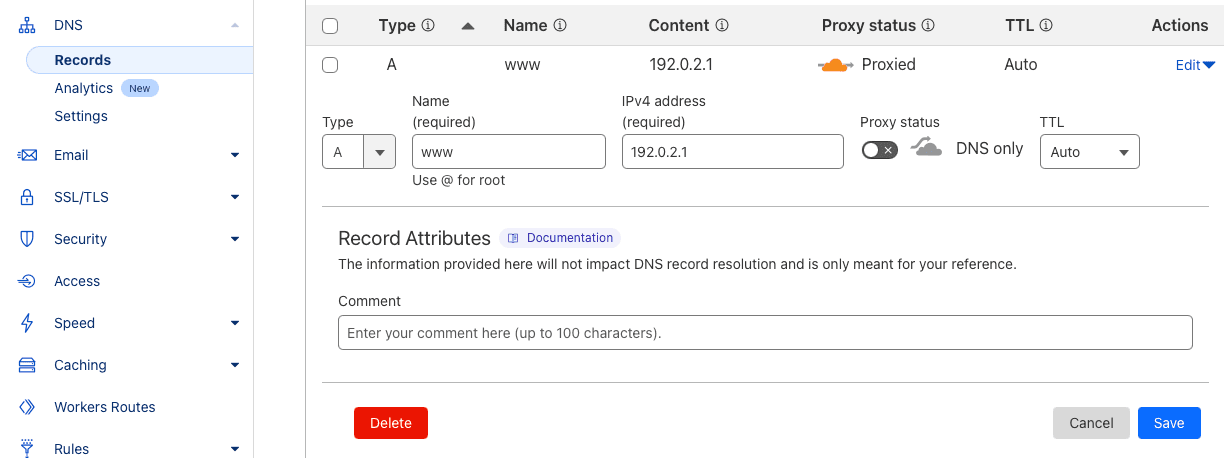
How to Disable Cloudflare's Proxy

You need to disable Cloudflare's proxy for other services (such as Linkly) to be able to issue SSL certificates for your domain.

How to Disable Cloudflare's Proxy

1

Login to Cloudflare

2

Click on your domain in the domain list

3

Click 'Edit' on the record you want to adjust

Edit is on the right hand side.

4

Set the 'Proxy status' switch to off and press 'Save'

5

Verify that it says 'DNS only' after saving

Frequently Asked Questions

Can I use Cloudflare proxy with Linkly?

No. If you re-enable Cloudflare's proxy, Linkly will disconnect your domain within 48 hours.

The reason is because we cannot issue a certificate on the domain unless it points to us.

I've disabled the Cloudflare proxy but it still won't connect to Linkly

Check the DNS using https://dnschecker.org is what you expect it to be.

See the custom domain setup guide for Linkly's DNS records.

How do I set up a domain to use with Linkly?

See the custom domain setup guide.

Track 1000 monthly clicks with all features included.

No credit card required