
コンバージョントラッキング
クリック数はリンクが人気だったことを示します。しかし、それがお金を稼いだかどうかは示しません。
コンバージョントラッキングはそのギャップを埋めます。誰かがLinklyリンクをクリックして後で何かを購入した場合、Linklyはそのリンクに対して売上を記録します。これにより、トラフィックごとではなく、リンクごとの収益を確認できます。
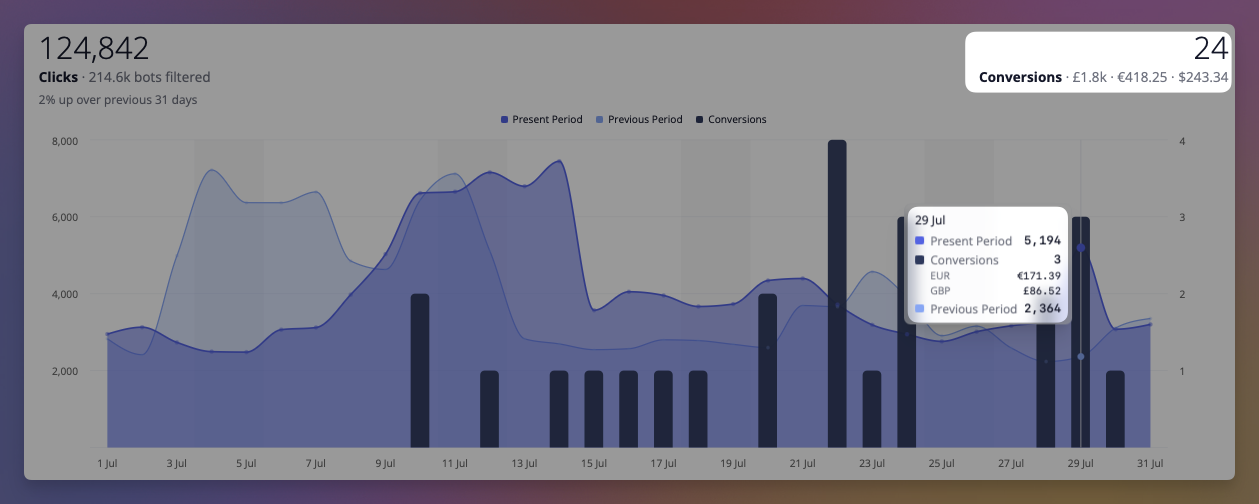
仕組み
リンクでコンバージョントラッキングが有効になっている場合、Linklyはリダイレクト時に宛先URLに短い識別子を追加します。
https://yourstore.com/product?linkly_cid=2ejmw.01KYT5RTSHNMMPWWQ18V570TVG
その識別子はクリックに名前を付けます。人ではありません。訪問者自身のデバイスで記憶され、購入が発生するとLinklyに送り返されて、売上をクリックにマッチングできるようにします。購入がリンクにマッチングできない場合、Linklyはそれを破棄します。あなたの店はあなたの売上の記録であり、Linklyの仕事はどのリンクがそれを稼いだかを言うだけです。
統合を選択する
売上がLinklyに到達するには4つの方法があり、リンクは1つだけ必要です。お金が変わる場所と一致する行を選択してください。
| 統合 | 最適な用途 | セットアップ |
|---|---|---|
| Stripeアプリ | Stripe Payment Linksおよびstripeで構築されたチェックアウト | Stripe App Marketplaceからアプリをインストール。Payment Linksはコード不要 |
| Calendly | 予約ページ。予約された会議がコンバージョン | LinklyでCalendlyを接続。コード不要 |
| Google Analytics 4 | GA4に購入を送信している既存サイト | 1つのスクリプトタグを追加 |
| API | カスタムチェックアウト、サーバー側レポート | 売上ごとに1つのHTTPリクエスト |
StripeとCalendlyは独自のWebhookを使用してレポートするため、インストールするスクリプトも、ページに追加するものもありません。他の2つはLinklyスクリプトがサイト上で実行されることに依存しています。Stripe Payment LinkまたはCalendlyページを新規リンクフォームに貼り付けると、Linklyが正しいものを指します。
Stripe
Stripe App MarketplaceからLinkly Conversion Trackingをインストールし、アプリでConnect to Linklyをクリックして、Stripeアカウントが属するワークスペースを選択します。Stripe Payment Linkを指すリンクの場合、その追跡とアナリティクスオプションでConversion trackingをオンにします。セットアップ全体はこれです。Linklyはクリック識別子をclient_reference_idとしてStripeに渡し、Stripeは支払いが完了したときにそれを返し、売上がリンクに対して記録されます。サブスクリプション更新は最初に顧客を獲得したリンクに、払い戻しは差し引かれます。
独自のCheckout Sessionsを構築する場合は、クリック識別子をclient_reference_idとして、またはメタデータのlinkly_cidとして自分で渡してください。アプリは無料で読み取り専用です。詳細はStripeガイドをご覧ください。
Calendly
LinklyのIntegrationsからCalendlyを接続し、Calendlyの予約ページを指すリンクのコンバージョントラッキングをオンにします。これらのリンクから行われた各予約は、リード変換として記録されます。Calendlyガイドを参照してください。
Google Analytics 4
サイトがGA4に購入を送信している場合、Linklyは同じイベントを読み取ることができます。2番目の統合は不要で、既存のトラッキングに変更を加える必要もありません。
すべてのページに以下を追加してください。
<script src="https://cdn.linklyhq.com/linkly.js" async></script>
設定するものはなく、コピーするキーもありません。属性識別子は既にリンクに名前を付けており、リンクは1つのワークスペースに属しているため、Linklyは売上がどこに属しているかを自動的に判断します。
LinklyはGA4 purchaseイベントを監視し、イベントが発火するとコンバージョンを記録します。既に送信しているイベントからトランザクションID、値、通貨を読み取ります。gtag.jsおよびGoogle Tag Managerで機能します。
購入以外を追跡するには、追跡対象のイベントをリストアップしてください。
<script src="https://cdn.linklyhq.com/linkly.js" data-ga4-events="purchase,generate_lead" async></script>
GA4ブリッジをオフにして自分でコンバージョンを報告するには、data-ga4="false"を追加してください。
自分でコンバージョンを報告する
カスタムチェックアウトの場合、独自のコードから売上を報告してください。
linkly('track', 'purchase', { amount_cents: 4999, currency: 'USD', event_id: 'order-1234' });
サーバー側レポートはより信頼性が高く、オプションがある場合はより良い選択肢です。ブラウザによってブロックされる可能性がないためです。linkly('id')で属性識別子を読み取り、注文とともにバックエンドに送信し、そこから売上を報告してください。
機能することを確認する
常にイベントIDを送信してください。注文番号が理想的です。Linklyはこれを使用して既に見た売上を認識し、顧客が確認ページを更新したときに購入が2回カウントされるのを防ぎます。
知っておくとよいことがいくつかあります。
- 追跡対象のリンクのクリックのみがカウントされます。 コンバージョントラッキングはリンク単位で有効化されるため、測定したいリンクでそれをオンにしてください。
- 売上は訪問者がクリックした最新のリンクに帰属します。 誰かが2つのリンクをクリックした場合、後のリンクがクレジットを受け取ります。
- 属性設定はセットアップが即座ではありません。 コンバージョンは、統合がライブになった後に訪問者が追跡対象のリンクを通じて到着した場合にのみマッチングできるため、数字を判断する前に1日程度待ってください。
プライバシー
Linklyがリンクに追加する識別子はランダムです。人ではなくクリックを識別し、個人情報は含まれません。それを見た誰でも個人にトレースすることはできません。
統合が顧客の詳細を送信する場合、Linklyはそれを売上自体とは別に保存し、削除リクエストは人を削除しても売上の記録をリンクが稼いだままにします。
トラブルシューティング
コンバージョンが表示されていません。 リンクでコンバージョントラッキングが有効になっていることを確認し、自分でクリックして、到着時にアドレスバーにlinkly_cidが表示されることを確認してください。表示されない場合、リンクは追跡されていません。Stripe Payment Linkの場合、新規リンクフォームとトラフィックページの両方に、Stripeアプリがこのワークスペースに接続されているかどうかが記載されています。接続されていない場合、何も記録されません。
GA4の購入が記録されていません。 テスト注文を実行しながらGA4のDebugViewを監視することで、purchaseイベントが実際に発火することを確認してください。Linklyは同じイベントを読み取るため、GA4がそれを受信しない場合、Linklyも受信しません。
数字が店舗と完全に一致しません。 そうすべきではありません。Linklyはリンクの1つにトレースできる売上のみをカウントします。店舗はすべての売上をカウントします。2つの間のギャップは、障害ではなく、機能のポイントです。
毎月500クリックを無料で追跡できます。