
Gerador de Links WhatsApp
O Linkly facilita criar, editar e rastrear links de clique para conversar no WhatsApp diretamente do editor de links.
Um link WhatsApp usa o formato wa.me:
https://wa.me/447700900123?text=Hello%2C%20world!
Quando alguém clica neste link, o WhatsApp abre com seu número de telefone e uma mensagem pré-preenchida pronta para enviar. Não é necessário salvar o número primeiro.
Por que usar Linkly para links WhatsApp?
Você pode criar links wa.me em qualquer lugar, mas criá-los através do Linkly oferece:
- Rastreamento de cliques — veja quantas pessoas clicaram em seu link WhatsApp, de onde e em qual dispositivo.
- Testes A/B — alterne entre diferentes números de WhatsApp ou mensagens para ver o que converte melhor.
- Retargeting — adicione Facebook Pixel ou Google Tag Manager aos seus links WhatsApp para remarketing.
- Links com expiração — defina links WhatsApp para expirar após uma certa data ou número de cliques.
- Códigos QR — gere um código QR para seu link WhatsApp para usar em materiais impressos.
- Domínios personalizados — use seu próprio domínio de marca em vez de um link curto genérico.
Como criar um link WhatsApp rastreado
Faça login no Linkly e clique em Criar Novo Link.
Cole sua URL WhatsApp no campo Destino.
Digite um link wa.me como https://wa.me/447700900123?text=Hi ou apenas digite wa.me e o Linkly adicionará o https:// para você automaticamente.
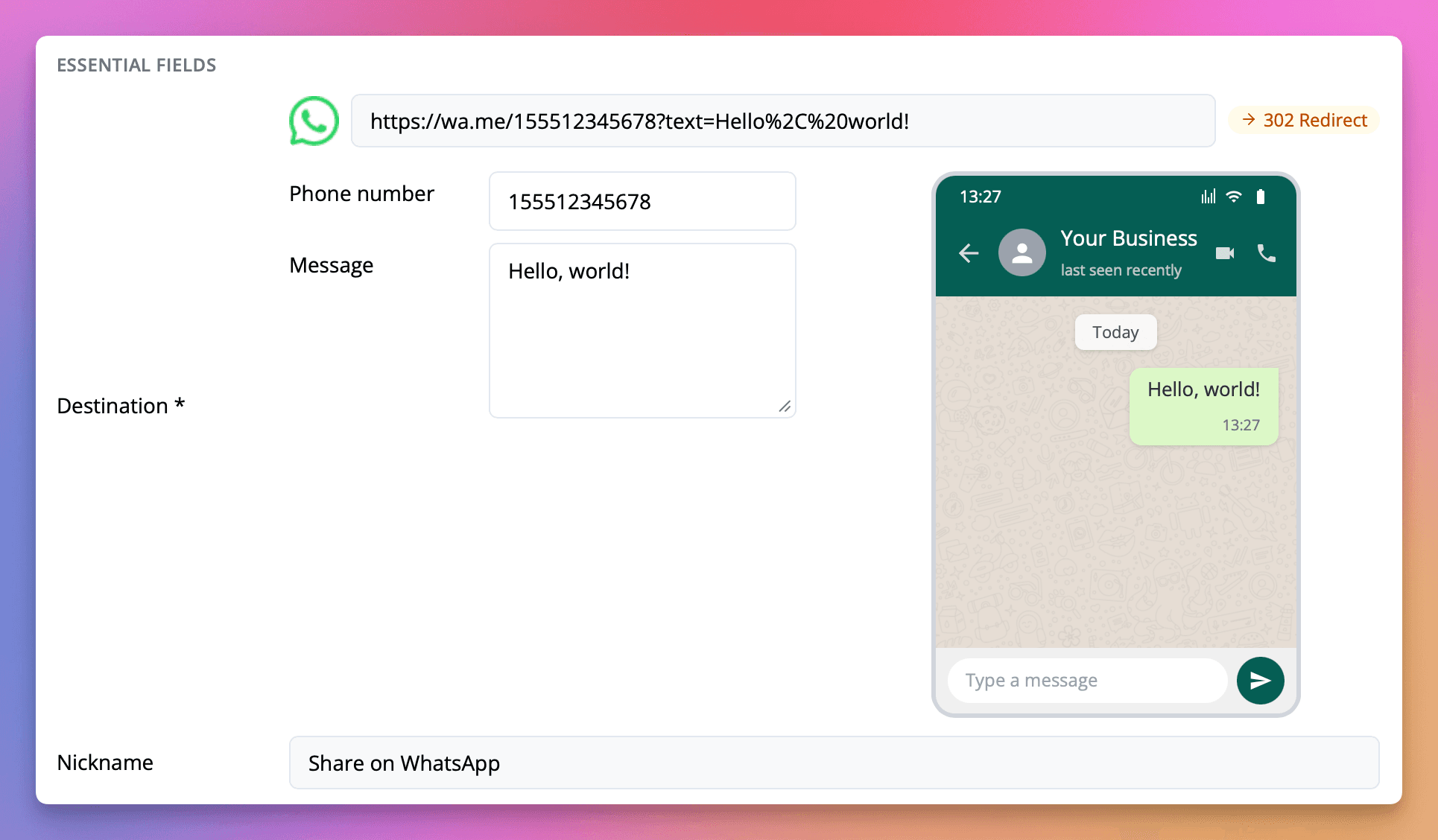
Edite o número de telefone e a mensagem no formulário pop-out.
Assim que o Linkly detectar uma URL WhatsApp, um formulário aparecerá abaixo do campo de destino. Edite os campos Número de telefone (apenas dígitos, incluindo código de país) e Mensagem. Uma visualização ao vivo mostra como a mensagem aparecerá no WhatsApp.
Adicione um apelido e quaisquer outras opções.
Dê um nome ao seu link para poder encontrá-lo depois. Opcionalmente, configure pixels de retargeting, tags UTM, domínios personalizados ou datas de expiração.
Clique em Salvar.
Seu link WhatsApp rastreado está pronto para compartilhar. Use a URL do link curto — quando alguém clicar, ele será redirecionado para o WhatsApp com sua mensagem pré-preenchida.
Formato de número de telefone WhatsApp
O WhatsApp requer números de telefone em formato internacional sem o sinal +, espaços ou hífens:
- Estados Unidos:
15551234567(1 = código do país) - Reino Unido:
447700900123(44 = código do país) - Irlanda:
353861234567(353 = código do país) - Alemanha:
4915112345678(49 = código do país)
O campo de número de telefone do Linkly aceita apenas dígitos, então você não precisa se preocupar em incluir acidentalmente espaços ou caracteres especiais.
Gerador de links WhatsApp gratuito
Se você apenas precisa gerar um link wa.me rápido sem rastreamento, também pode usar nossa ferramenta Gerador de Links WhatsApp gratuita — nenhuma conta necessária.
Relacionado
- Rotador WhatsApp — Distribua usuários entre vários grupos WhatsApp com um único link. Perfeito para gerenciar limites de tamanho de grupo.
Perguntas frequentes
Preciso de uma conta WhatsApp Business para usar isso?
Não, os links de clique para conversar no WhatsApp funcionam com contas regulares do WhatsApp e contas do WhatsApp Business.
Posso rastrear cliques no meu link WhatsApp?
Sim. Ao criar seu link WhatsApp através do Linkly, cada clique é rastreado com análises completas incluindo localização, dispositivo, referenciador e hora do clique.
O que acontece se eu mudar o número de telefone ou a mensagem?
A URL de destino é atualizada automaticamente. Se seu link já foi compartilhado, o link curto permanece igual — qualquer pessoa que clicar nele será redirecionada para a conversa WhatsApp atualizada.
Posso usar um domínio personalizado para meu link WhatsApp?
Sim. Você pode usar qualquer domínio personalizado que tenha adicionado ao seu espaço de trabalho do Linkly, oferecendo um link curto de marca em vez de um genérico.
Rastreie 500 cliques mensais com todos os recursos incluídos.