
Link Change History
When several people share a workspace, or an integration is updating your links through the API, it's useful to answer the question "who changed this link, and when?"
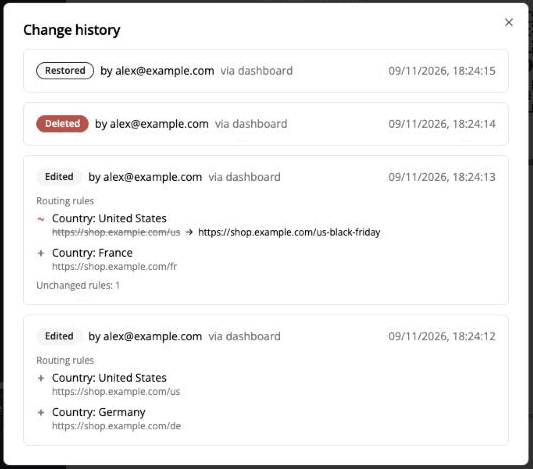
Change history keeps a record of every edit, deletion and restore for each link, including exactly what was changed.
Where to find it
- 1Click Links in the left-hand menu and open the link you want to check.
- 2Click Edit this link to open the link's edit page.
- 3Look under the link preview in the right-hand sidebar for Change history. It lists the most recent changes.
- 4Click View all, or any entry, to open the full history.
The sidebar is shown on larger screens, so use a desktop or laptop browser window. If you don't see Change history, nothing has been recorded for that link yet.
What each entry shows
- What happened: the link was Edited, Deleted or Restored. If every link in the workspace was deleted at once, the entry reads Deleted with all links.
- Who: the email address of the team member who made the change.
- How: where the change came from: the dashboard, an API key, an OAuth app, basic auth, IFTTT, or the system.
- When: the date and time, in your local time zone.
- What changed: for edits, every field that was changed, with the old value crossed out and the new value beside it.
Routing rule changes
Changes to country, device and rotator rules are shown as a readable list instead of raw data:
- + a rule was added
- − a rule was removed
- ~ a rule's destination or percentage was changed
Country names are shown in your language, and rules that didn't change are summarised as a count. See how to redirect by country for more on routing rules.
What isn't recorded
- Creating a link isn't listed as a change.
- History starts from November 2026. A link that was edited before then won't show those earlier changes.
- It's per link. There isn't a workspace-wide log or export of changes.
- It's view-only. To undo a change, edit the link and set the old value again.
Everyone in a workspace can edit its links (see how to add a user), so change history is the quickest way to find out what happened when a link suddenly goes somewhere unexpected.
Frequently asked questions
Can I see who deleted a link?
Yes. Deleted links record who deleted them and when. If the link was restored, the restore is listed too.
Why does a change show no user?
Changes made automatically by Linkly itself, and changes by someone whose Linkly account has since been deleted, are attributed to the system instead of a person. Changes made through the API show the team member who owns the API key.
Plan availability
Included on every plan
Get 100 short links and track 500 monthly clicks for free.